




Eugene wrote:
Hope you can help with this. I’m trying to number paragraphs like so:
1
1A
1B
1C
2
2A
2B
I thought there was an option for setting up numbered paragraphs this way?
InDesign CS3 (and later) offers an excellent automatic numbering feature, though it’s somewhat hard to decipher. Here’s the basic setup for doing multi-level numbers in a list:
You’re going to want at least two paragraph styles (one for each level). I usually create “List Level 1” first, with pretty much the default settings:

Then I make a second paragraph style, based on the first, but with slightly different auto-number settings:
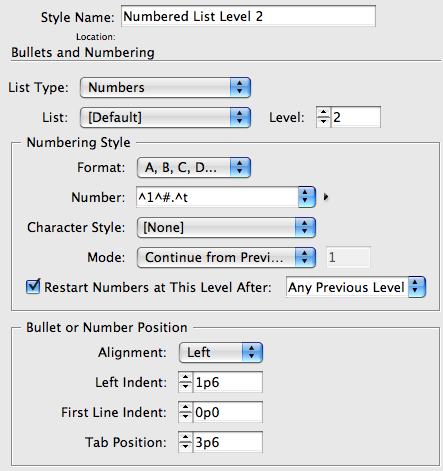
Note the differences in Level, Format, Number (the ^1 code means insert the number from the last “level 1”), and Left Indent. Where did I get those codes? Check out that little triangle pop-up menu to the right of the Number field!
Anne-Marie just read the draft of this post (over my shoulder, as it were) and emailed me: “Don’t forget to suggest he add Level 2 style as Level 1’s next style.” That’s a good idea (as long as you don’t mind getting a level 2 everytime you press Return/Enter after a level 1).
The result makes just the kind of list you need:

In fact, because this is kind of difficult for people to get the first time, click here to download an INX file with these two paragraph styles in it. (See, Klaus? Sometimes I just give the fish away.)
Of course, if you need your numbered lists to jump across non-threaded frames, you’ll also need to set up Lists, as we talked about in this post.
I’m sure Anne-Marie is going to tell me, “hey, buddy, you forgot to talk about ______” but I’ll leave that for her (and others) to comment on below. :)
This article was last modified on December 19, 2021
This article was first published on February 6, 2009
Commenting is easier and faster when you're logged in!

Recommended for you

Quickly Renumber a List in InDesign
Khara Plicanic shows how to renumber an InDesign list without digging through me...

Quickly Renumber a List in InDesign
Khara Plicanic shows how to renumber an InDesign list without digging through me...