



Did you ever turn on hidden characters and not understand some of the markings you saw onscreen? Or wonder what some of the little controls attached to a text frame did?
Well, wonder no more. The InDesignSecrets Guide to Special Characters has been updated, and includes new characters, like endnote markers…
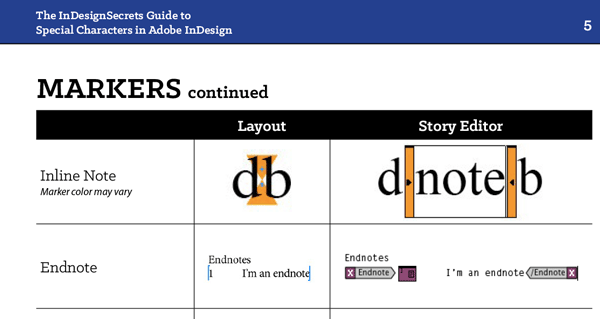
as well as text frame adornments…

and PDF bookmarks.

The guide is free to download. You just need to be a member here at CreativePro to get it. If you’re logged in with either a free or premium membership, the download link for the guide appears below. Enjoy!
Premium or free members, please log in at the top of the page, or become a member of CreativePro.This article was last modified on September 21, 2022
This article was first published on March 2, 2018
Commenting is easier and faster when you're logged in!

Recommended for you

Tip of the Week: Changing Case
This tip was sent to Tip of the Week email subscribers on April 9, 2015. Sign up...

Scanning Around With Gene: The Death of Free Calendars and Local Drug Stores
Two developments this week lead me to today’s topic. First, I began my search fo...

CreativePro Conversations: Better Digital Asset Management With Canto
Come see Mike Lacey from Canto show off how easy digital asset management can be...