


Tips for Background Tasks


When you export a file to PDF (Print) or IDML, InDesign begins the process in the background. On the front of the program it can look like nothing is happening. But there’s a small sign that something is going on, as InDesign displays a new icon in the Application Bar.

What’s also great about this icon is that you can click it to open the Background Tasks panel.

See also: Why Is InDesign Soooo Slow?
In the panel, you can keep an eye on current background tasks or click the ‘x’ to cancel them. Other than that, the panel doesn’t tell you much. It tells you the name of the file, the progress of the job by a percentage, and it will display an alert if something goes wrong.
For example, using a font that does not allow embedding will cause the Background Task to give a warning about this.

There’s also an option to “Show alerts in Background Tasks panel only”.
If this isn’t showing for you then go to InDesign > Preferences (Mac) or File > Preferences (Windows), and in General settings, click the button to Reset All Warning Dialogs.
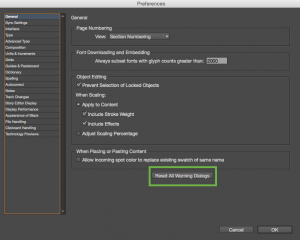
The Background Task Alert should now show whenever there is an issue with an export/save. Of course you can still click that option and alerts will only show in the Background Tasks panel, but it’s important to know how to get it back.
Fixing Background Task Problems
Background tasks can go wonky at times. So if you’re having issues with a file that won’t export in the background, read the troubleshooting documentation at Adobe.com. If you don’t care about the ability to export in the background, you can try turning the feature off. In some cases this will solve the problem and allow you to export your file to PDF.
And if you’re still having issues, pop over to the forums and we’d be happy to help out!
This article was last modified on May 12, 2021
This article was first published on October 5, 2015
Commenting is easier and faster when you're logged in!

Recommended for you

Making Sure Blackout Redactions Work So You Cannot See Through Them
Have you ever placed a black box over something, trying to blot out whatever was...

How an Accordion Controls Photoshop’s Levels Command
The following is an excerpt from Speaking Photoshop CC by Dave Bate. Reprinted,...

Scanning Around With Gene: Gun for the Whole Family
When it comes to liberties, the right to bear arms is, for many Americans, one o...