


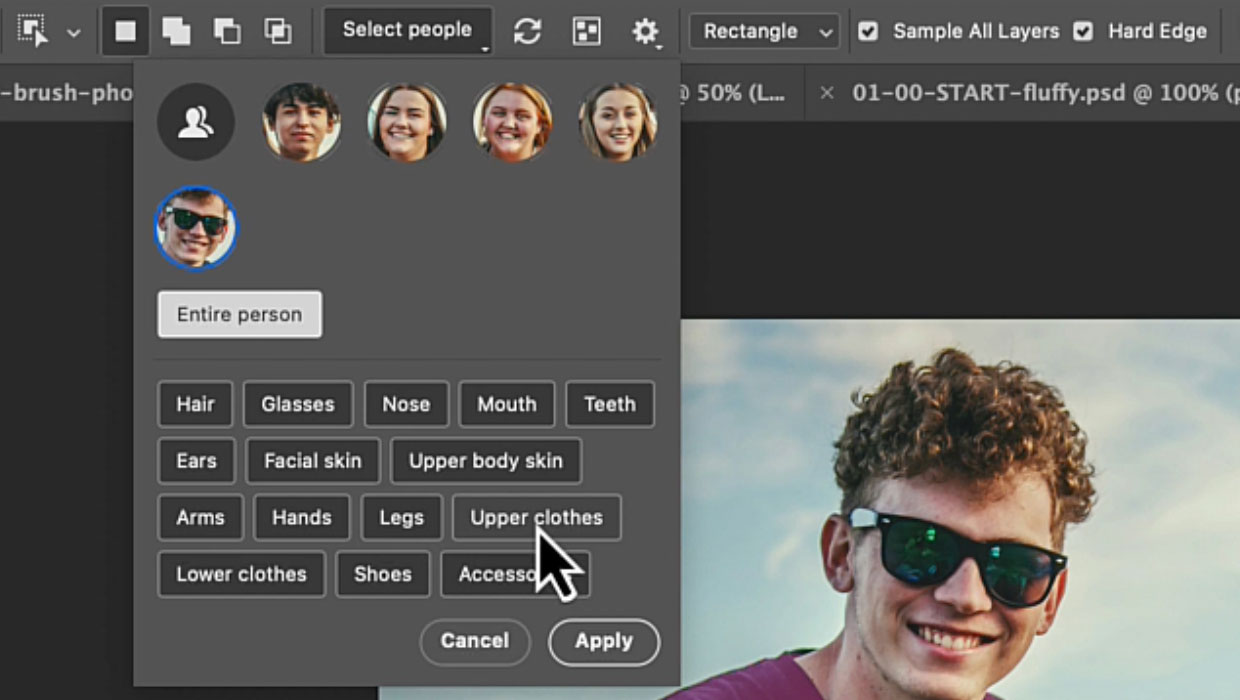
The Object Selection tool now includes a powerful Select People feature that is perfect for selecting people and all their details, such as clothing and body parts. Give it a try:
- Use the Object Selection tool on a photo with people.
- Click Select People in the Options bar.
- Choose Details to edit specific body parts or clothing items (Figure 1).

You can now do everything you would normally do with a selection. For instance, you can change the clothing with Generative Fill:
- Click a person in the Select People list, then select Upper Clothes.
- Click Apply, then extend the selection a bit in the Expand Selection dialog box (Select > Modify > Expand). You can start with 20px, but use a higher number when your image is larger.
- Use Generative Fill with a prompt like Green T-shirt to change colors instantly (Figure 2).

This workflow opens up endless possibilities for targeted adjustments without complex masking.
This article was last modified on November 3, 2025
This article was first published on October 1, 2025
Commenting is easier and faster when you're logged in!

Recommended for you
Design How-To: Turn One Photo Into a Thousand Images
You can subscribe to “Before & After Magazine” in PDF or Print....
How to Compare Two PDFs Using Acrobat
See all the differences in two PDFs at a glance with this quick Acrobat tip.
Seeing the Benefits of Accessible Color
Accessible color choices can help your work reach more people—and make you a bet...