




On an earlier post, I mentioned how you can use a custom stroke style to make an interesting frame, and Mariella commented that my tip could be extended to create some cool frames around pictures. I took the bait and started playing… and came up with some fun effects.
Here’s the effect she was talking about — a photo with a matte and a frame:
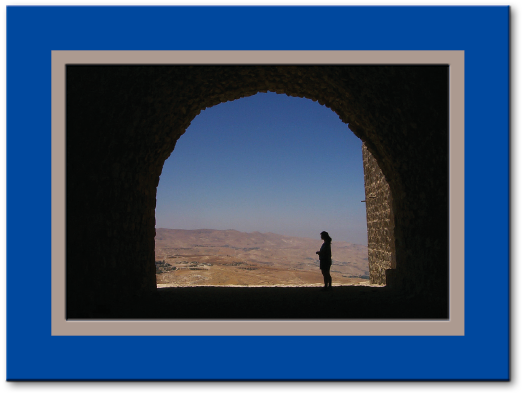
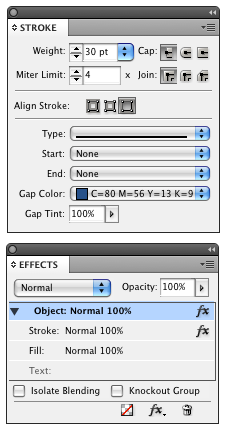
That’s one stroke on the outside of the picture, using a similar “inner stripe” stroke I made in the earlier post (the stroke color is tan and the gap color is blue):

Then I applied a small bevel & emboss to the Stroke, and a small drop shadow to the Object. Obviously, you can control the thickness of the matte vs. the frame by dragging the little triangle in the Edit Stroke Style dialog box.
Here’s a black and white version:

In this case (above), I cleared the transparency effects, then selected the image itself with the Direct Selection tool and applied an Inner Shadow in the Effects panel. Look, ma’, I’m floating!
You can also have fun playing with the corners and edges using Corner Effects, or changing the Join setting in the Stroke panel. Here’s a few I made after going hogwild:
Applying a normal double stripe stroke, then using Fancy Corner effect, then choosing Object > Paths > Close Path (to convert corner effect into actual bezier points), then changing stroke join to Round Join:

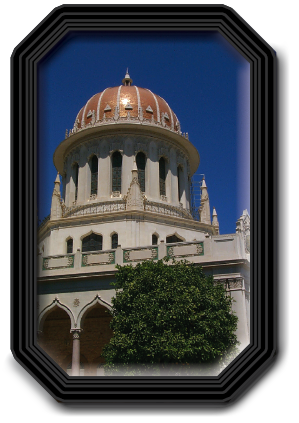
Here’s one with bevel corner effects, a custom 4-stripe stripe stroke, and a drop shadow and bevel & emboss on the stroke:
I’m having way too much fun. Gotta’ stop. Got real work to do. Grr.
Want to play around with any of the frames I’ve made here? Download and unzip this INX file. Note that I have created object styles for each of these frames, so you can copy and paste, or edit at will. (You won’t have my pictures, so you’ll have to insert your own after opening the INX file in InDesign.)
By the way, as I’ve said repeatedly before, I’m not a designer. I’m sure that some of you out there can come up with even prettier examples. If you do, send them to me or post them on flickr or somewhere we can see them.
Oh, there is one other way to make even cooler photo frames… but I’m going to have to hold off to another day for that one.
This article was last modified on December 19, 2021
This article was first published on January 27, 2009
Commenting is easier and faster when you're logged in!

Recommended for you

InDesign Magazine Issue 98: Animation
We’re happy to announce that InDesign Magazine Issue 98 (June 2017) is...

How to Fix the Fill on Items with Wavy Strokes
InDesign's “fancy” stroke styles don’t adhere to shape of the path you apply the...