




I love visiting new countries because there is always some design I see that catches my eye and I wonder, “How would I do that in InDesign?” Regular listeners know that I’m visiting Dubai at the moment, doing some InDesign training for Chillout Productions. While eating a wonderful buffet breakfast with labneh, fool madamas, olives, and a host of other foods that I enjoyed trying, I glanced over an English-language newspaper and saw an ad that included a series of photos that had an inset stroke, like this:

(No, that’s not a photo of Dubai… it’s Tokyo. But hey, we’re nothing if not multi-cultural around here.) ;)
Okay, so it’s a white line around the image… but inset slightly from the edge. Here’s how I would do it:
Choose Stroke Styles from the Stroke panel menu and create a new Stripe like this:

When I opened the dialog box, there were two stripes; I just dragged one of the little black triangles on the left out of the dialog box, deleting it. Then I dragged the other triangle down. Notice how the stripe is only a small percentage of the width of the stroke.
Now I can apply this new stripe to my image frame and set the stroke alignment to “inside”:
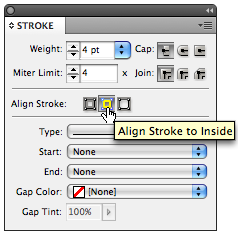
Adjust the thickness of the stroke to get the effect you want. You can also go back and edit the stroke style definition to make it thicker or adjust its position in the frame. To get the rounded corners, I used Object > Corner Options with a 1p radius.
When you get it just right, save this as an object style!
By the way, you can apply this effect to other objects, too, with some very interesting effects. For example, this lets you put a stripe on one side of a path but not the other. Or, here’s what happens when applying it to text that has been converted to outlines (you have to create outlines because InDesign can’t apply a custom stroke style to editable text yet):
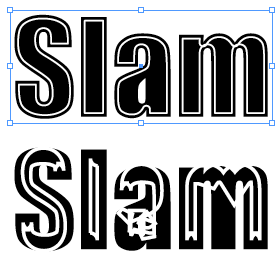
The text on the top has a stroke thickness of something like 3 pt… but when I increased the thickness to 8 or 9, it completely wigged out (bottom)… cool!
By the way, as Iran is just across the gulf as I type, I figured I’d play Niyaz here in my hotel room. If you don’t know this group, and you like electronica (e.g., Delerium, etc.), you must check it out.
This article was last modified on December 19, 2021
This article was first published on January 18, 2009
Commenting is easier and faster when you're logged in!

Recommended for you
Remove Blemishes in Photoshop With a Click
Khara Plicanic shows us how to remove blemishes from skin in Photoshop with just...

Interview with Karen Larson, Brand Strategist and Artist
Discover how Canva can fit into impactful, professional workflows.
How to Balance Text Columns Automatically and with Baseline Grid
Bring balance to your InDesign spreads with this Text Frame Option.