




If you’ve ever wanted to try your hand at designing user interfaces for mobile apps, but a lack of coding knowledge has held you back, you might want to check out an application called PaintCode by PixelCut. Billed as "the missing bridge between programmers and graphic designers", PaintCode allows anyone with a good eye for digital design (and a Mac computer) to draw objects that are automatically converted to clean, resolution-independent code that can be used to build apps for Mac OS, iPhone, and iPad.
The results rival anything you could do with traditional high-end drawing applications.

If you’re an Adobe Illustrator user, PaintCode will probably seem quite familiar. You can draw Bezier objects from scratch or use shape tools to make rectangles, ovals, polygons, stars, and so forth. Then you can fill and stroke objects with solid colors or gradients, and apply effects like beveling, and inner and outer shadows.
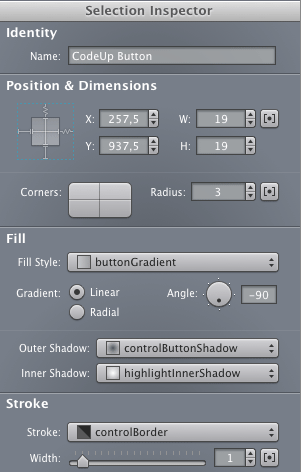
You can preview your work as it would appear in both standard and Retina displays.
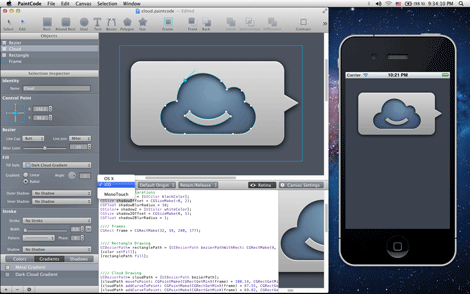
And when you’re finished, you can hand off your code to a developer who can copy and paste it directly into Xcode to use in an app.
This introductory video shows how you can quickly create great looking vector UI elements for apps with PaintCode.
The PaintCode website has extensive documentation, a series of video guides, and a gallery of gorgeous examples of what you can create.
Of course, all this power and beauty does not come cheaply. You can download PaintCode at the Mac App Store for $99.99. A free trial version is also available.
This article was last modified on January 8, 2023
This article was first published on June 25, 2012
Commenting is easier and faster when you're logged in!

Recommended for you

Mapping Paragraph Styles to PDF Tags in InDesign
Map Paragraph Styles in your InDesign document to the proper tags for accessible...

Sort Cross References
Cross-references are printed in the order in which they were added to the docume...

Interview with Joy Pollard, Designer and Adobe Certified Professional
Learn how roller derby, astronomy, and theater influenced one designer’s journey...