


A Script to Extract Pages from InDesign Documents
Split any InDesign document in seconds
Oops, you’re not logged in!
Log in or sign up for a free account.


Ever needed to break a large InDesign file into clean, separate documents? Stop copying, pasting, and praying. The Extract Pages script turns tedious, error-prone manual splitting into a single, confident click.
Pull out any pages you want — a range, every page, or every spread — or let the script split intelligently by Section, by Paragraph Style, or by Alternate Layout.
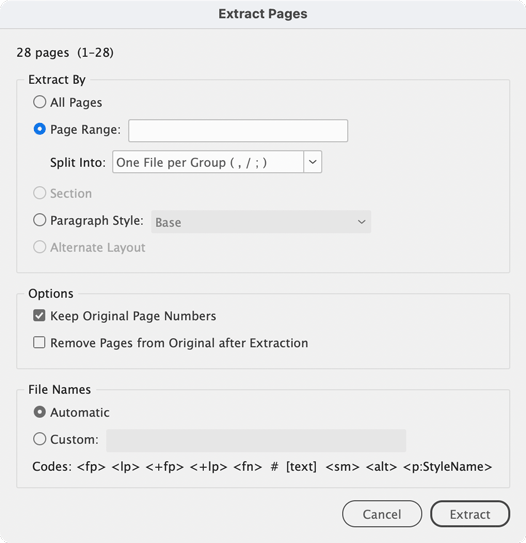
Building business cards, chapters, or per‑client versions? It even dynamically names each file for you using powerful custom templates (page numbers, section markers, or text pulled straight from your layout). Helpful tooltips are provided for each option in the dialog.
Under the hood, it’s engineered like a pro tool: original page numbering is preserved exactly, facing‑page spreads stay intact, threaded stories come out clean with no reflow chaos, and your original file is never touched unless you ask. Whether you’re working with a 20-page brochure or a thousand-page catalog, it delivers clean, predictable results every time without breaking a sweat.
Install once and launch it right from the File menu, anytime. Or if you prefer, launch it directly from the Scripts panel.
If your workflow involves books, catalogs, magazines, brochures, multi-version artwork, or large production files, the Extract Pages script is the time-saving utility you’ll wonder how you ever worked without.
Downloading the Script
Be sure you are logged in, then click the green Download Now button at the top of this page.
Installation
Main Script
- Place ExtractInDesignPages.jsxbin in: /Applications/Adobe InDesign 2026/Scripts/Scripts Panel/ or any subfolder within Scripts Panel/ (e.g., Scripts Panel/A-RKScripts/).
- The script will appear in the Scripts Panel (Window > Utilities > Scripts). Double-click it to run, or use the File menu command below.
File Menu Integration (Optional)
For quick access from the File menu, install the startup script:
- Place ExtractPages_Startup.jsx in: /Applications/Adobe InDesign 2026/Scripts/startup scripts/
- Relaunch InDesign to register the command.
- Extract Pages… will appear in the File menu, just above Package…
The startup script automatically searches for ExtractInDesignPages.jsxbin throughout the Scripts folder, so no path editing is needed if you reorganize your scripts later.
This article was last modified on October 1, 2026
This article was first published on September 18, 2026
Commenting is easier and faster when you're logged in!

Recommended for you

Index Fixes: Sorting
InDesign doesn't distinguish letter-by-letter and word-by-word sorting, it suppo...
Footnote Spacing (Pre-CC2017)
Adjust the space between main text and single footnotes. InDesign's setting for...
Update Index
When you edit an index, for example to combine entries, you can end up with un-w...