


Missing Glyphs
InDesign shows missing glyphs as pink boxes. The script can be used to list all missing glyphs in a document and to apply a font to them.
Oops, you’re not logged in!
Log in or sign up for a free account.


This script is part of the Type and Text collection. See the full collection here.
For years, finding a solution to discovering missing glyphs – the dreaded pink boxes – in InDesign has eluded scripters — until Peter Baumgartner came up with a solution that works very well (the link to that post no longer works, thanks to Adobe’s forum migration). The script on this page uses Peter’s solution but adds an interface which shows a document’s missing glyphs in a window (rather than in the integrated development environment), and allows you to apply a font to the missing glyphs.
When run, the script shows the following dialog:
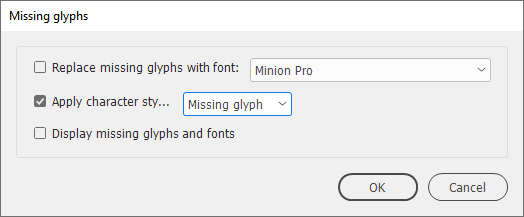
In the dropdown, style groups are shown in parentheses following a style name, just as, for example, in InDesign’s Table of Contents window.
You can choose to apply a font or a character style to all missing glyphs, or simply to display the missing glyphs. The glyphs are shown in a new dialog:
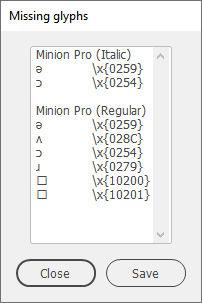
Missing glyphs are shown by font, so a glyph can be listed more than once.
Note: It’s not possible to find missing glyphs in overset text.
Version history
23 Dec. 2025: Fixed a bug (null is not an object).
4 Apr. 2025: Added a workaround to ignore fonts in linked images.
7 Jan. 2025: Added support for style groups to the script’s interface.
15 Sept 2022: The script didn’t include footnotes by default. Fixed.
25 Nov. 2019: Added the possibility to apply a character style to any missing glyphs.
2 July 2017: Removed some version-specific code.
3 February 2013: the script crashed when it tried to process uninstalled fonts or illegal font style names. Fixed.
10 August 2012: the script cannot be used in CS3, and now announces that rather than crash; better display when no missing glyphs are found.
8 August 2012: posted.
Peter Kahrel Script Repository
Hosted as a community service, and with deep appreciation, by CreativePro.com
Scripts by Topic | Script Index
Basic Script Installation and Use
How to Modify or Configure These Scripts
Resources for Scripting and Publishing Automation
About This Repository
Contact Peter Kahrel
Note to users: You run scripts at your own risk: CreativePro and the author accept no liability for anything that may be caused by any of these scripts. Always take the necessary precautions. We encourage you to save backups and test scripts on copies of your documents.
This article was last modified on August 22, 2026
This article was first published on January 29, 2026
Commenting is easier and faster when you're logged in!

Recommended for you
Filtered File > Open Dialog Box
Here's a way to filter file types in your Open File dialog box.

The Peter Kahrel Script Repository Gets a CreativePro Makeover
Peter Kahrel is one of the most prolific and influential InDesign scripters of a...