



Today Adobe is releasing InDesign CC 2015, with several very cool new features — including one amazing feature/service listed as a “technology preview.” Keith Gilbert is going to go in-depth into all the features, how they work, and why you want to use them in the July issue of InDesign Magazine, but for now, we just want to give you a quick peek at what you can expect if or when you upgrade.
(By the way, you should definitely read this other blog post BEFORE you click the Upgrade button!)
While the few new features in InDesign CC 2015 are neither earth-shattering nor life-changing, they are pretty darn cool (think “evolution not revolution”), and they will certainly help many InDesign users.
Paragraph Shading
No longer will you have to resort to workarounds to add a background color to a paragraph. Now you can apply solid colors and gradients that automatically fit the size of a paragraph via new options in the Control panel and the Paragraph Style dialog box.
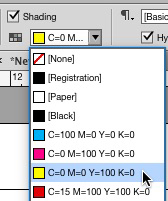

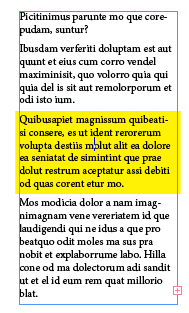
Unfortunately, shading is currently fill-only. That is, you can’t put a stroked box around a paragraph yet. Hopefully that option is coming soon, but the just fact that this long-awaited feature finally exists is great news.
Publish Online!
In the English-language versions of InDesign CC 2015, Adobe is including a “technology preview” of a feature called Publish Online. You can think of this as “publish from InDesign to the Web,” as the result is your document in a Web browser. All your fonts work fine (and there are no licensing issues to worry about with Publish Online). Plus, animations are supported, as well as buttons and multi-state objects.
To publish your document to the Web, choose File > Publish Online (Preview), or click the Publish Online button in the Application Bar above the document window.
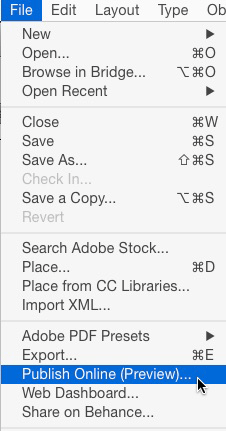
When you choose this option, a dialog box appears that asks which pages you want to publish, if you want individual pages or spreads, what image quality to target, etc. InDesign then converts your pages to a package of HTML, CSS, and JavaScript, and sends the package to an Adobe server.
That’s right: Your document can only be shared on Adobe’s servers, not your own. That’s the bad news; the good news is that Adobe adds helpful navigation and control buttons along the bottom of the document window:
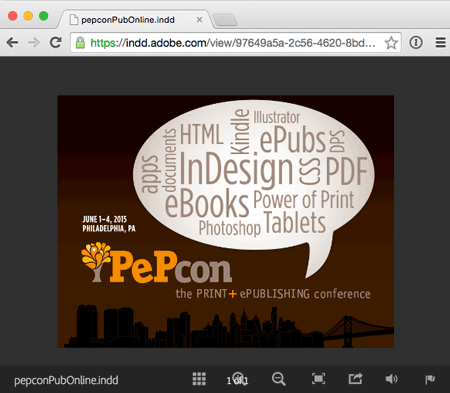
You can then share the URL with other people. For example, check out this example document here.
Keep in mind that Publish Online is a technology preview. That is a fancy way of saying “public beta.” That is one of the main reasons the feature currently only works in the English versions of InDesign. Adobe assures us that it will work in all supported languages soon.
Graphic Table Cells
In the past, if you wanted to insert an image in a table cell, you had to add it as an inline anchored graphic. Resizing and cropping the image independent of the table cell was tedious and inconvenient.
To address this problem, InDesign CC 2015 features a new type of table cells: graphic cells. When a table is first created, it’s business as usual: all the cells are text cells. But placing an image in a cell via drag and drop or with a loaded place cursor will convert the cell to a graphic cell.
Initially, InDesign scales your image so that it fills the cell (like the Fill Frame Proportionally feature). Technically, it appears that InDesign is still actually creating a graphic frame and anchoring it inside the cell. But the graphic frame in the cell updates automatically as you change the size of the cell (by adjusting the position of the rows and columns). So you can actually select the image inside the cell and give it rounded corners, or convert it to a polygon, or even apply drop shadows to it. Pretty nifty!

CC Library: Text Styles and Linked Assets
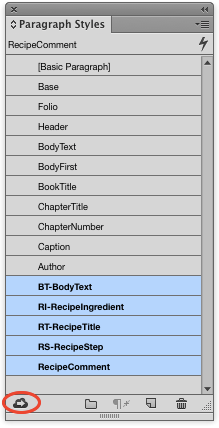
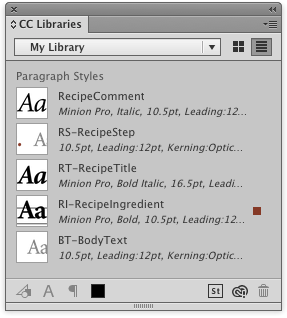
CC Libraries were first added to InDesign CC 2014.2. (They are in addition to, but not replacing InDesign’s traditional Library feature.) CC Libraries allow you to store and share creative resources across CC applications and “Touch” apps. And now they have been greatly enhanced in InDesign CC 2015, with full support for character and paragraph styles. To add one or more styles to a CC library, just select them and click the new button at the bottom left of the panel.
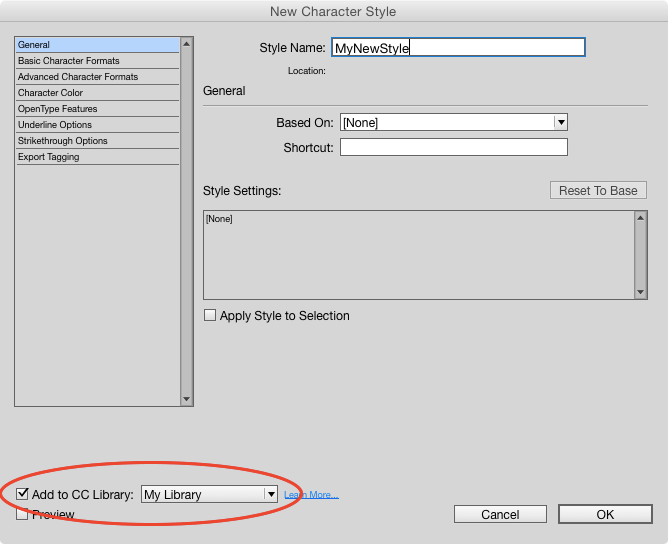
You can also add new styles to a CC library when you create them, via an option in the new style dialog boxes.
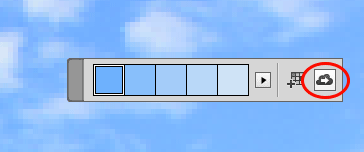
Also, now when you use the Color Theme tool, you can add the sampled color theme to your current CC Library with a single click.
But one of the coolest new features in CC Libraries is that you can now link to graphics! That is, you can use Illustrator or Photoshop to add objects or images to your CC Library, then place those graphics into your InDesign document via the CC Library—and they remain linked. In the Links panel, you’ll now see a cloud icon displayed to the right of these types of objects to indicate that they are linked to a Library asset in the cloud.

That means you can update the object in the CC Library later and it will appear as Modified in InDesign (just as though you had linked to a file on your local disk).
Adobe is clearly putting a lot of work into CC Libraries, and we think we’ll see many more features like this coming down the road.
Adobe Stock
Remember when Adobe bought Fotolia last year? Well, check out Adobe Stock, now built right into InDesign, Photoshop, and other CC apps. You can choose File > Search Adobe Stock and you’re quickly taken to your web browser where you can search (and buy) stock photography. We don’t know much about Adobe Stock yet, but we think it could be a nice addition to CC.
Performance Improvements
Finally, Adobe tells us that they have improved InDesign’s screen drawing performance so that it is up to twice as fast as it was back in CS6. That’s surprising to us, as it was already pretty snappy. We haven’t tried time trials yet, but in our limited testing it certainly seems at least a bit faster.
In Sum
All in all, this update feels more like an evolution than a revolution. But the enhancements in CC libraries and the paragraph shading feature promise to change the way many of us work on a daily basis.
Articles about other upgrades in recent years:
- What’s New With InDesign CC 2014
- What’s New in InDesign 2014.2 February 2015 Release
- Adobe InDesign CC Ships
…and remember that we’ll be exploring InDesign CC 2015 in even more depth at The InDesign Conference:

This article was last modified on July 25, 2019
This article was first published on June 15, 2015
Commenting is easier and faster when you're logged in!

Recommended for you

How to Extract a Table from a PDF in Acrobat
Get your data out of a PDF and into an Excel Workbook with this quick Acrobat tr...
The Peter Kahrel Script Repository Gets a CreativePro Makeover
Peter Kahrel is one of the most prolific and influential InDesign scripters of a...
