




CS4 introduced a new consistent interface for the Adobe applications. This included the application frame for mac users, a tabbed interface and a other changes. One useful, but small change is the introduction of visual feedback of the save status for your open files.
When you have a file (or multiple files) open look at the name at the top of the documents window. If there is a small * next to the file name, it means that the file has not been saved since the last change.
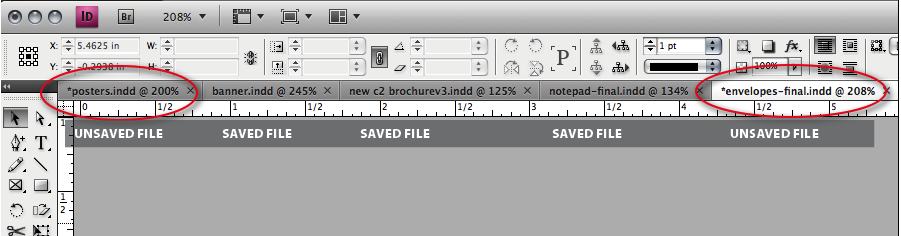
This is not unique to InDesign CS4. Every other CS4 app that uses this updated interface also will use the *filename feedback to let you know if the file has been saved.
This article was last modified on December 1, 2023
This article was first published on June 3, 2009
Commenting is easier and faster when you're logged in!

Recommended for you

Point Editor
InDesign's drawing tools are pretty good, but handling Bézier curves can be fidd...

How to Enable Photoshop’s Quiet Mode to Stop “Helpful” Pop-Ups
Turn on Quiet Mode in Photoshop for a more peaceful workflow.