



In my long document production workflow, I use Quick Apply throughout the day. I use it to apply paragraph styles, character styles, and object styles, and to insert text variables, among other things. It saves me hours of time digging through style panels with hierarchical style groups. If you’re not familiar with Quick Apply, I suggest you take a few moments and learn about how it can speed up your workflow.

But for at least seven years now, there has been a bug related to Quick Apply that causes InDesign to crash. Here is a forum post about it from 2010!

Here at InDesignSecrets, there was even a blog article that bemoaned this repeated crashing.
But recently, Adobe came out with a patch! I installed it last week and haven’t had a single InDesign crash since then! That hasn’t happened in, well… forever!
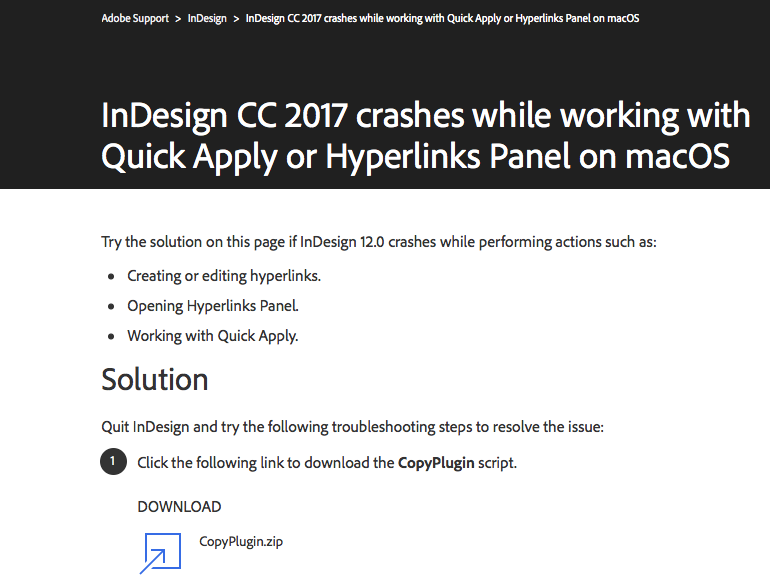
Interestingly, this is a link to the the Adobe Support site. I wanted to see if a regular non-Adobe-engineer could also find the same fix. And indeed, the article outlining the fix shows up as the first result when I search the Adobe Support site.

But here is what I find most interesting about this. As an InDesign user for over fifteen years, I wasn’t aware that Adobe released minor problem-specific patches. My understanding was that bug fixes were only addressed as part of overall program upgrades. So imagine my surprise when I called out for help and an Adobe engineer actually responded that day with a fix!
So as much as I’d like to believe that the Adobe support engineers developed this fix just for me, that’s not true. They did however, respond to my call for help with the fix from their website. And interestingly enough, I may have been able to access the solution sooner than I thought.
Pause for a moment and try to remember the last time InDesign crashed on your computer. You would have gotten a dialog box like this one from CS4.

Awhile back, Adobe added a checkbox to suggest a solution or workaround. For so long, Adobe was never able to find a solution to any type of Problem Description that I typed into the box.

See? No solution!

This happened so often, and for so long, that out of habit, I always clicked “Close without reading what was in the secondary dialog box.” But wait a minute! Look closer. In this case, Adobe has found a solution! The problem with this dialog box is that the important details are too easy to miss.

I’d like to propose a different design of this dialog box so that the all-too-important detail of a solution isn’t missed.

My proposed redesign of the crash dialog box: If there is a solution, make it clear!
So if you encounter frequent crashing related to Quick Apply or editing hyperlinks, this solution may help: https://helpx.adobe.com/indesign/kb/crash-hyperlinks-panel-quick-apply.html
This article was last modified on July 20, 2021
This article was first published on January 23, 2017
Commenting is easier and faster when you're logged in!

Recommended for you

An Unexpected Use for the Hyperlinks Panel
The other day I was working on some chapters for a book I was typesetting, when...
What is the Meaning of DT in the Links Panel?
What it means when the location of a linked image is listed as DT in the InDesig...
New Contest! The Text That Wouldn’t Move
Hey folks, it’s time for another InDesign mystery that you can solve for a...