




The other day I was working on some chapters for a book I was typesetting, when I discovered a helpful trick in the Hyperlinks Panel. The chapter was 27 pages of all text that had been pre-styled (properly, with Paragraph and Character styles), except that I noticed a lot of missing spaces between sentences—one sentence would be followed immediately by the beginning of the next. “Crud!”
As I was thinking about the trip I would need to make to the “Find/Change” dialog box (searching for a period followed by “Any Letter”), I remembered that there were a few hyperlinks that I had to make active in the References section, so I opened the Hyperlinks Panel and ran the “Convert URLs to Hyperlinks” command. Imagine my surprise when InDesign found not the three hyperlinks I knew were in the References, but 25!
Upon closer inspection, I saw that InDesign had found all the instances of two sentences that were not separated by a space. Well, at least those where the first sentence ended with a period. To fix any that might have ended with a question mark, I was going to have to use Find/Change. But for the others, I could click on the page number listed in the Hyperlinks Panel and quickly jump to the offending sentences and insert a space. Then it was just a matter of selecting all these non-hyperlinks in the Panel and dragging them to the trash.
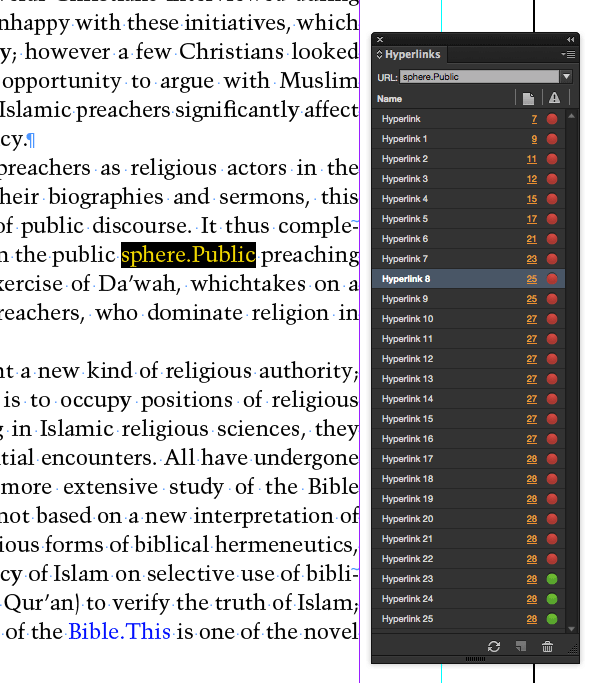
This also demonstrates one of the ways the “Convert URLs to Hyperlinks” command works: by looking for text separated only by a period (as in a URL). Should you find yourself in a similar predicament, using the “Convert URLs to Hyperlinks” command in the Hyperlinks Panel will quickly show you where you need to add some space!
This article was last modified on July 25, 2019
This article was first published on April 27, 2015
Commenting is easier and faster when you're logged in!

Recommended for you

GREP Styles to Local Character Styles
For various reasons it can be beneficial to apply a document's GREP styles as lo...
Review: Astute Manager Pro
This new service makes it easy to back up, restore, and sync your Illustrator se...