


Before&After: A Single Row of Photos Carries Your Reader from Here to There


It’s out-of-the-ordinary, attractive, and easy, too—a single row of photos carries your reader from here to there. Put your copy on the right, and the reader’s eye will follow the path directly to it. This 12-page article from issue 42 of Before&After Magazine will instruct you how to use this easy method to make your message stronger: Turn your page sideways, and line up a half-dozen (or so) identically sized Photos, starting at the left edge..
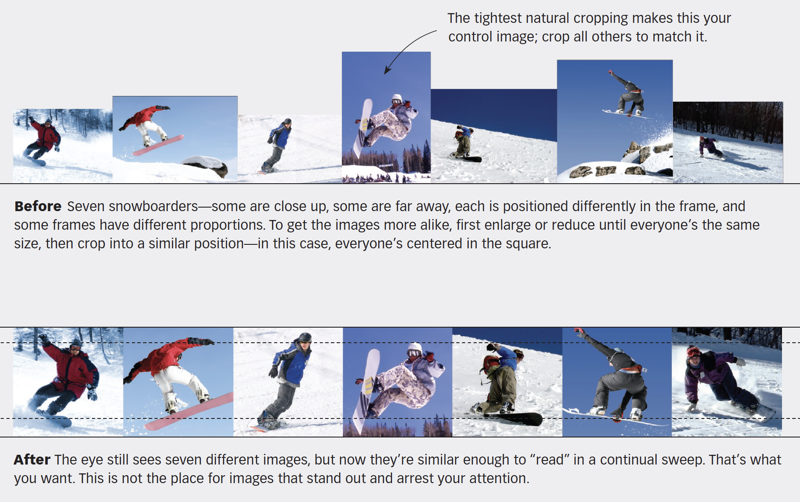
A picture path is most effective when its images are similar enough that the eye just glides along. Size, cropping and alignment are key
© John McWade/Before&After Magazine, courtesy of Gaye Anne McWade.
Commenting is easier and faster when you're logged in!

Recommended for you

Before&After: Gestalt Theory: Similarity
Elements of similar shape, color, or other attribute can seem to belong together...

Before&After: Design a Card the Easy Way
A photo and one block of type are all it takes to make a beautiful business card...

Before&After: How to Use that Typeface
That font you just learned about won’t work just anywhere; it has a style that n...