



This InDesign tip on knowing your options and alts in InDesign was sent to Tip of the Week email subscribers on January 26, 2017.

Sign up now and every week you’ll get a new tip, keyboard shortcut, and roundups of new articles, plus exclusive deals sent right to your Inbox!
Just scroll down to the bottom of this page, enter your email address, and click Go! We’ll take care of the rest. Now, on with the tip!
Are you annoyed by the “are you sure” alerts that pop up when you click on a trashcan in one of InDesign’s panels to delete a page containing objects, or a swatch that’s in use, etc.?
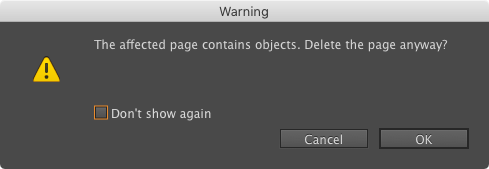
Skip the alerts by holding down Option/Alt while you click the trashcan. (This works in Photoshop and Illustrator, too.)
Note: While Option/Alt makes the alerts go away when deleting, the same key forces a dialog box to appear when clicking a “New” button. For example, clicking the New Paragraph Style button just creates a style. Option/Alt clicking forces the New Paragraph Style definition dialog box to appear, so you can name or define your style!
This article was last modified on July 25, 2019
This article was first published on February 1, 2017
Commenting is easier and faster when you're logged in!

Recommended for you

Tip of the Week: Seeing Page Sizes with the Page Tool
How to see the size of any document page in InDesign, using the Page tool.
Poll Results: Which Interface Color Theme Do You Use?
The results of our poll on what kinds of styles you use and a new poll asking ab...

InDesign Magazine Issue 136: Advertising
We’re happy to announce that InDesign Magazine Issue #136 (August 2020) is now a...