



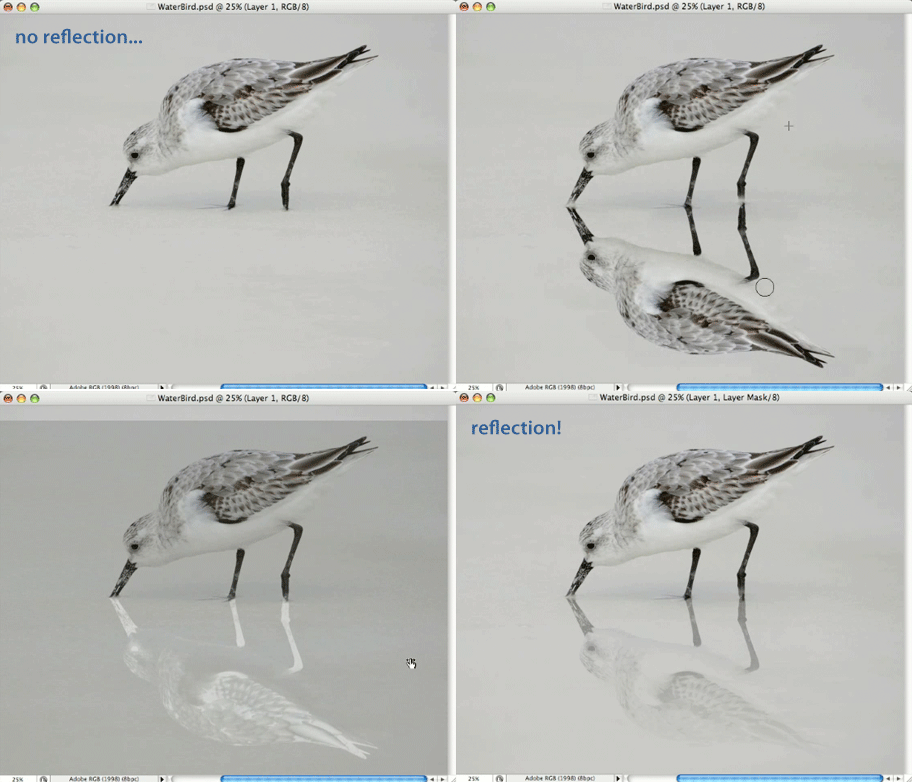
This Photoshop CS3 tutorial is an installment of The Russell Brown Show.
Realistic reflections are a very popular effect in today’s imagery. You can hop on the bandwagon by following the instructions in this easy-to-follow tutorial.
Click on “Mirror Mirror” or the animation below to begin streaming the 7MB QuickTime video.
If you don’t have QuickTime installed, you can get it here.
It won’t take you long to add a reflection using this technique.

This article was last modified on January 5, 2023
This article was first published on May 23, 2008
Commenting is easier and faster when you're logged in!

Recommended for you
Big Discount on Topaz DeNoise
Topaz Labs is currently offering a deal where you can get their photo noise redu...
How to Create Panoramas in Lightroom
As with a lot of things in digital photography, creating panoramas was once more...
Using Photoshop Templates
Do you suffer from Blank Page Syndrome like I do? Instead of staring at the void...