



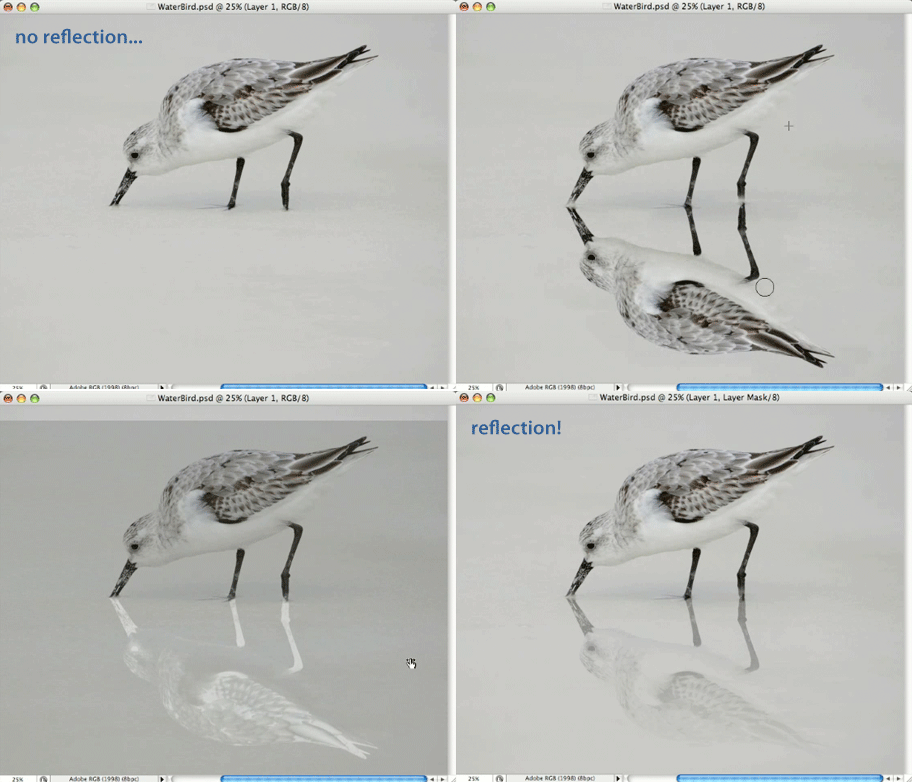
This Photoshop CS3 tutorial is an installment of The Russell Brown Show.
Realistic reflections are a very popular effect in today’s imagery. You can hop on the bandwagon by following the instructions in this easy-to-follow tutorial.
Click on “Mirror Mirror” or the animation below to begin streaming the 7MB QuickTime video.
If you don’t have QuickTime installed, you can get it here.
It won’t take you long to add a reflection using this technique.

This article was last modified on January 5, 2023
This article was first published on May 23, 2008
Commenting is easier and faster when you're logged in!

Recommended for you
Create Beautiful Contact Sheets Easily With DiapoSheet
If you need to build a contact sheet of images you have lots of options. You can...

Editing Highlights and Shadows in Adobe Lightroom and Camera Raw
Adobe Photoshop Lightroom and Adobe Camera Raw have two sets of controls for mak...
Using Photoshop Templates
Do you suffer from Blank Page Syndrome like I do? Instead of staring at the void...