


Script of the Month: Color Contrast Validator
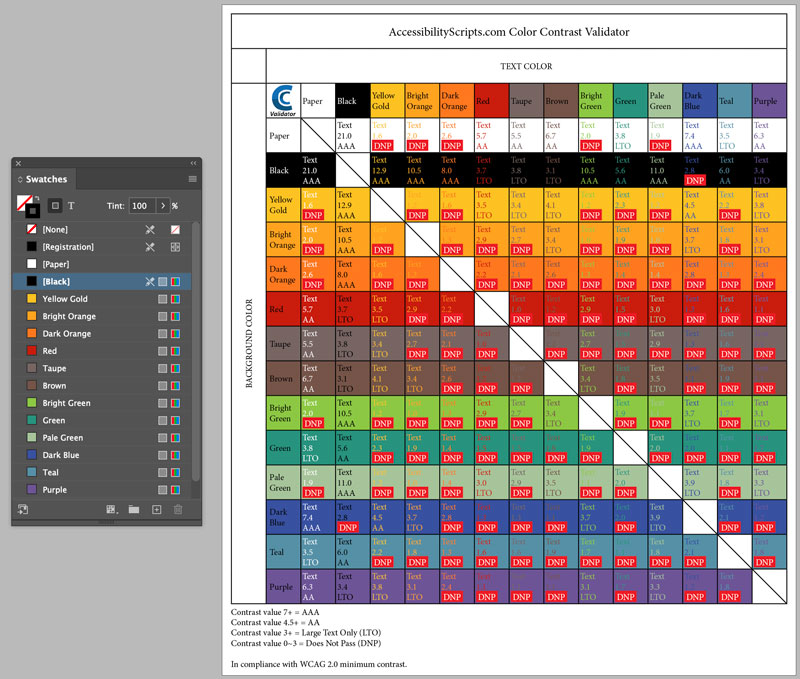
This month’s exclusive script can be used to test the contrast of your color swatch combinations without ever leaving InDesign.


This article appears in Issue 149 of InDesign Magazine.
Contrast is such a key topic in the realm of accessibility that it’s mentioned in three of the articles in Issue #149 of InDesign Magazine. The various tools and services for checking contrast cited in those articles have one thing in common: They all take you out of InDesign. And, most of them involve a significant amount of manual work to check specific color combinations.
The month’s Script of the Month offers the double benefit of allowing you to check the contrast of many color combinations against the WCAG 2.1 standards in an automated fashion without ever leaving InDesign.
To get the script, head to accessibilityscripts.com.
Use the coupon code ccv_idsom (valid through July 31, 2022) during the checkout process to download the script for free.
When you run the script, you can choose whether to compare two swatches or all swatches in your document.

If you compare two swatches, you can see which tints pass the validation test. If you compare all swatches, you can see the contrast values for every possible combination of foreground and background colors.
Commenting is easier and faster when you're logged in!

Recommended for you
Graphic Standards Manual Earns Top Kickstarter Title
Wayfinding fans—and New York City enthusiasts of all kinds—are no doubt glad to...

Callas pdfCorrect 2.0 Allows Flexible Adjustment of Correction Profiles
On the occasion of Print & Converting 05, callas software (booth 7263) laun...
2015 Holiday Gift Guide
It’s that time of the year again. Decorations are going up, there’s a chill in t...