



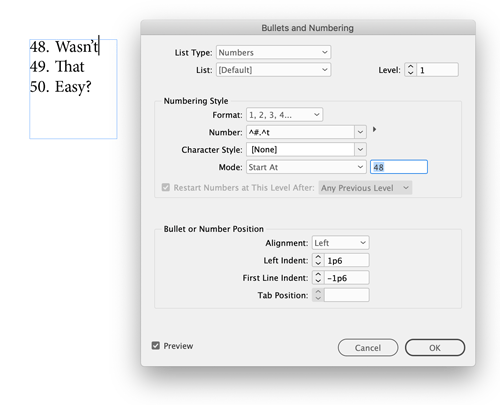
The fastest way to force an auto-numbered paragraph to restart at a custom number is to place your cursor in the paragraph you want to renumber and then Option/Alt-click the Numbered List icon in the Control panel. That opens the dialog box where you can enter any number you want in the Mode: Start At field. Enter your number, click the OK button, and the numbered list fixes itself.
This article was last modified on January 12, 2026
This article was first published on May 13, 2019
Commenting is easier and faster when you're logged in!

Recommended for you

InDesign How-to Video: How to Customize Placeholder Text
In this week’s InDesignSecrets video, Erica Gamet shows us how to customize InDe...

Women in Design
A look at eight designers who have helped shape the world of layout and typograp...
InDesign How-to Video: How to Create a Gravity Text Effect
In this week’s InDesignSecrets video, David Blatner reveals how to add a gravity...