



Diane wondered:
Sometimes (it was this way in Quark, too), the space before leaders is different on different lines. There shouldn’t even be a space there but it looks like there is.
Yup. It has always been this way, and unfortunately it probably always will be. Here’s an example:
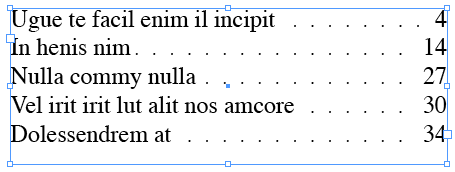
Look at the spaces to the left of the dot leaders (before the dots). On the first line it’s like there’s a huge space there; on the second line it’s really tight. Frustrating! Why does it work this way?
It’s because dot leaders are always set right-to-left, and it does that because it’s trying to ensure that all the dots (on each line) line up vertically. See what I mean? Each dot lines up with the dot above/below it. That’s lovely. But in order to create that nice effect, something has to give — and in this case it’s the space on the left.
If you don’t like how tight that dot is on the second line, you could place a space after the text. That makes that first tight dot disappear. But then the second dot looks a bit too far away.
The only other solution is to adjust the tracking or size of the dots. I like assigning a character style to the dot leaders (using nested styles or grep styles or whatever). Then you can make the dots smaller and space them out. Edit the character style with the Preview checkbox is on, and you’ll see that tiny changes make a big difference. Then it’s just a matter of trial and error.
This article was last modified on December 19, 2021
This article was first published on October 30, 2008
Commenting is easier and faster when you're logged in!

Recommended for you

Indexing a Range Rather Than Individual Pages
Miguel wrote: I just finished doing an Index and one of the topics looks like th...

How to Split Up a Single Page Into a Multipage Spread
So you’ve laid out an InDesign document on a single page, and now you want to sp...
Adjusting Word Spacing in InDesign
Robbie S wrote: Here’s a problem for you: I know there are keyboard comman...