




Jacob wrote to us with a problem he was having with a file: he was having trouble with some hyperlinks and so had deleted all the hyperlinks in his document… but the hyperlinks kept working in his exported PDF files! Why, he asks, won’t those hyperlinks stop working?
In this case, the problem is probably not corruption or anything terrible. In fact, it doesn’t really have anything to do with InDesign at all! Rather, it’s probably just a new(ish) feature in Acrobat. When “Create Links from URLs” is turned on in the General pane of Acrobat’s Preferences dialog box, it’s constantly looking for text that looks like it might be a Web address. Even email addresses are fair game, so if it sees an email address, it automatically treats it as though it had a mailto: link on it.
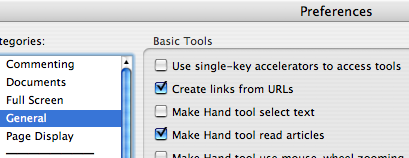
If it bugs you, go ahead and turn that preference off in Acrobat or break up the URL on your InDesign page so that it fools Acrobat.
This article was last modified on December 18, 2021
This article was first published on September 5, 2007
Commenting is easier and faster when you're logged in!

Recommended for you
Don’t Ask Your AI to Identify a Font
When it comes to identifying typefaces in images, artificial intelligence isn't...

A Script to Display InDesign Documents at Actual Size
Script makes Actual Size on screen match actual size in the real world, even if...
Resizing InDesign Layouts with AI
Most designers don’t create a single deliverable anymore. They create campaigns....