



This mystery was driving me crazy… why won’t the hyphenated word “fitting-room” break at the hyphen?
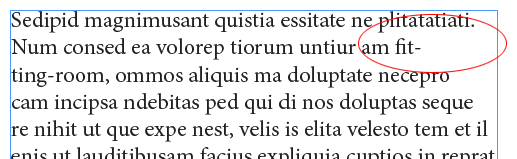
Instead, it forces the word “fitting” to hyphenate, leaving a large white space. I tried switching between paragraph composer to single-line composer; I tried adjusting the Hyphenation settings, and the Justification settings; I tried stomping my feet and using strong language. It just wouldn’t work the way it “should.”
Of course, I put the word “should” in quotes because what we believe is right and what InDesign believes is right are not always the same thing. And, especially in today’s political climate, it’s important that we remember to seek first to understand, then be understood. (A great old Covey maxim.)
So I sought to understand, but couldn’t figure it out. Fortunately, Mike Rankin came to the rescue and suggested I look at the Hyphenation pop-up menu in the Dictionary pane of the Preferences dialog box:
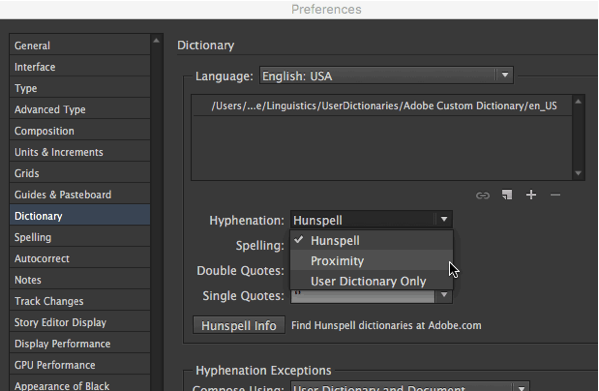
I hadn’t used that feature for so long that I had completely forgotten that there was an option here: Hunspell, Proximity, and User Dictionary Only. (This came up in the comments on this post from a couple years ago.)
The Hunspell hyphenation setting seems to be pretty good most of the time, but in this case it fails badly! When I set it to Proximity, it worked the way I expected on that hyphenated word:
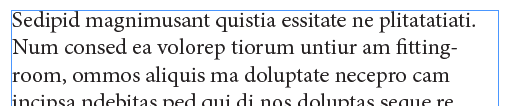
Wow! Just goes to show: a) it really helps to know all the little ins and outs of this program, and b) it’s so important to have a community of InDesign users to connect with when mysteries arise! Thanks, Mike!
This article was last modified on July 25, 2019
This article was first published on August 1, 2016
Commenting is easier and faster when you're logged in!

Recommended for you
How to Embed a Section Within a Slide in PowerPoint
Learn how to create non-linear structure within a PowerPoint presentation by cre...

Universe Software to Launch pdf-FieldMerge for Software Developers
PDF specialist UNIVERSE Software GmbH based in Solingen, Germany, has announced...

Blurb Introduces PDF to Book
Blurb, the creative publishing and marketing platform that enables anyone to des...