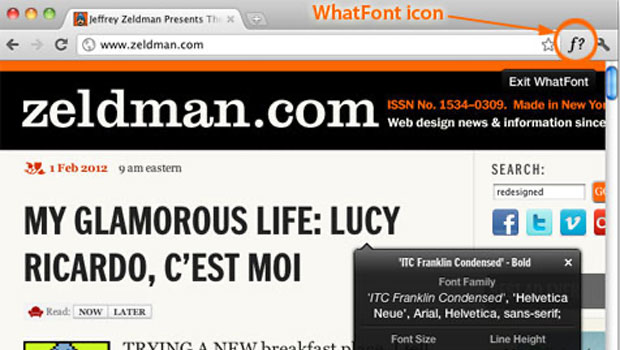
Chengyin Liu, an undergrad in Computer Science at the University of Illinois, has developed a handy web browser add-on for people who want to identify webfonts in a jiffy. The add-on, called WhatFont, is compatible with Firefox 3.6 and later; Chrome 9 and later; Safari 4 and later; Internet Explorer 9; and, to a lesser extent, Internet Explorer 8.
Installing WhatFont is as easy as dragging a bookmarklet to your Web browser’s bookmark bar. Then whenever you’re curious about a font on a webpage, you click the name or icon in the bar and hover over the text. WhatFont will reveal the typeface’s name, size, and color; its font family; what back-up font choices the web designers specified; and show you alphabetical upper-and lowercase examples of the font. If the font you’ve found is a Google font or from Typekit, WhatFont will also identify the relevant webfont service. There’s even a Twitter button you can click if you want to tweet your discovery.
Note that WhatFont differs from services such as What the Font and Identifont.

This article was last modified on January 8, 2023
This article was first published on February 6, 2012
Commenting is easier and faster when you're logged in!

Recommended for you

Interview with Joy Pollard, Designer and Adobe Certified Professional
Learn how roller derby, astronomy, and theater influenced one designer’s journey...
How to Make Motion Look Realistic in Premiere
Create a convincing animation in Premiere using the Transform effect.