


Show/Set Custom Text Variables
Display the names and values of custom text variables in a document; change them easily and create new variables conveniently.
Oops, you’re not logged in!
Log in or sign up for a free account.


This script is part of the Type and Text collection. See the full collection here.
The script displays all custom text variables* defined in the active document and shows their contents. It can also be used to change the contents of any text variable. I use it in master documents for journals to change variables for volume and issue numbers, publication dates, etc.
* Because of a ScriptUI limitation, usually between 30 and 35 variables are shown. The exact number is determined by the size of your screen and probably the vertical screen resolution.
Use
The script displays the dialog shown in the screenshot. The names of the text variables defined in the document are shown in the first column as field labels, their contents, in the fields.
The variables are shown in alphabetical order (which is how InDesign stores variables). To display any variables at the top of the window – e.g. group at the top those variables you change most often – you can prefix variable names with an underscore character.
If a variable name contains title (case-insensitively), its content is used for the dialog’s title.
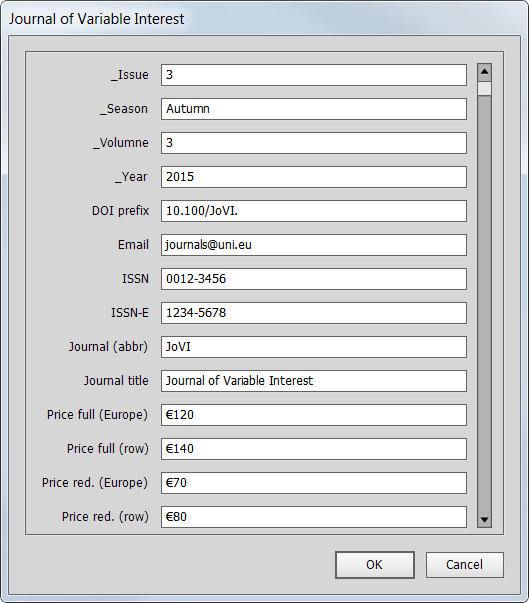
To change the contents of any variables, enter the new values in the text fields. When you’re done, press OK.
Version history
19 Aug. 2017: Added a note that the number of variables displayed is determined by the screen size and probably the vertical screen resolution, and is usually between 30 and 35.
14 Nov. 2015: The script’s pre-CC interface couldn’t cope with the changes in CC, so I rewrote the interface. The script now works in all versions of InDesign.
11 Feb. 2012: The fields are now in a scrollable panel, which is needed when a document contains more than 20 custom text variables.
17 July 2010: Fixed a problem with the display of long variable names.
Peter Kahrel Script Repository
Hosted as a community service, and with deep appreciation, by CreativePro.com
Scripts by Topic | Script Index
Basic Script Installation and Use
How to Modify or Configure These Scripts
Resources for Scripting and Publishing Automation
About This Repository
Contact Peter Kahrel
Note to users: You run scripts at your own risk: CreativePro and the author accept no liability for anything that may be caused by any of these scripts. Always take the necessary precautions. We encourage you to save backups and test scripts on copies of your documents.
This article was last modified on September 23, 2026
This article was first published on November 3, 2025
Commenting is easier and faster when you're logged in!

Recommended for you
Index Fixes: Multiple Indexes in an InDesign Document
InDesign documents can contain only one index. But when you need more than one i...
Sort Cross References
Cross-references are printed in the order in which they were added to the docume...

The Peter Kahrel Script Repository Gets a CreativePro Makeover
Peter Kahrel is one of the most prolific and influential InDesign scripters of a...