



Bits and Pieces
According to Apple, there are more than 150 new features in OSX 10.2, some big and others small. A number of the additions mark the return of features present in the original Mac OS (see figure 3.) and should quell some of the grumbling heard by longtime Mac users.
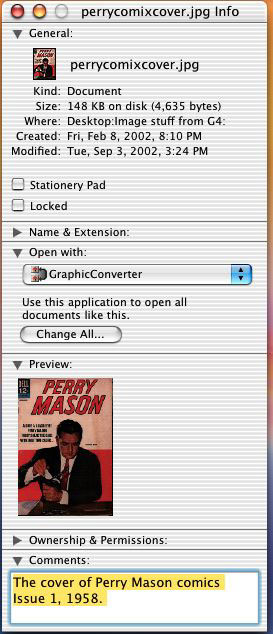 Figure 3: Longtime Mac users missed the ability to add comments to document information. The new Get Info screen shows all the information for a file, offers a larger preview image, and lets you add comments.
Here are a few interesting features of OS 10.2:
Save as PDF. In my column about the Quartz imaging model, I discussed its integration and use of PDF. The Jaguar update expands on that usage in some convenient ways. Previously, users could create a PDF through a convoluted process of printing, previewing, and then saving the resulting view in PDF format from the Preview application. Now, there’s a Save as PDF button on the print dialog, which vastly simplifies the process.
PDF conversion. While PDF is great, sometimes it’s nice to convert files from one format to another. For example, Jaguar’s screenshot service saves to PDF, rather than TIFF (or as in Mac OS 9 and before in PICT). Now, the Preview application can export PDF files into a variety of common formats, including BMP, JPEG, PICT, PNG and TIFF, as well as Adobe Photoshop.
Finding your stuff. Until the release of Jaguar, Mac users needed the Sherlock searching application to find items. With OS X 10.2, they can use an actual Find feature. In addition, a search field can be added to any Finder window (see figure 4).
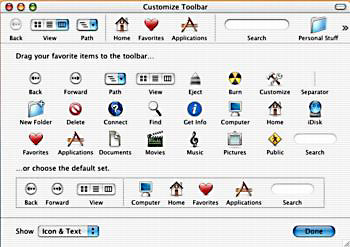 Figure 4: It finds! Here’s a shot of the Customize Toolbar window showing the new Search field that you can add to your View preferences. Still, it does take up a bit of real estate on a small screen.
Decision Time?
So, once again we face the question: Does Jaguar tip the balance for creative professionals? Is now the time to upgrade to OS X?
Since the introduction of OS X, I’ve offered the same response: Perhaps. For professional content creators the real question is whether your business or workflow can improve with the transition. And there’s the flip side of the question: How will you manage that transition?
I remain a segregationist: Mac-based content creators should move deliberately towards OS X, experimenting with a separate setup in order to work out every element of the new workflow. It’s a rite of OS passage: You will know when you are ready to move, when everything is proved to work.
My primary machine runs Mac OS X where I can appreciate its Quartz power, interesting new applications, and especially its stability. At the same time, I keep my necessary Classic applications and still-serviceable SCSI-based imaging peripherals on a powerful machine running OS 9. This workflow operates best in that environment and I save some money to boot.
Certainly, the Jaguar upgrade may fit the bill for many people since it addresses one of the primary concerns of professional content creators: speed, or its lack. At times, its performance approaches that of the speedier OS 9, while still providing OS X’s superior stability. Meanwhile, many important content applications have joined the list of native versions.
Yet, OS X is lackluster in some areas key to content creators, such as device drivers and printing. And while the list of native applications keeps growing, there still remains many critical holdouts for some workflows, such as QuarkXPress and many plug-ins. In addition, like every other software release, Jaguar brings its own share of bugs and problems, which must be fixed in forthcoming maintenance updates from Apple and third-party developers.
Meanwhile, the everyday use of OS X can amplify the effect of crashes under OS 9, no matter how infrequently. For example, I now forgo using my Internet browser when scanning or editing images on the OS 9 machine. Something in the code of an increasing number of sites is giving fits to my browser or Java Virtual Machine, hanging the computer. This isn’t a problem on Mac OS X — its browser and Java implementation are more robust and the memory-protected applications can’t interfere with each other. For some workflows, this situation could be more than an annoyance.
This reminds me of a rabbinic saying: “This world can be changed neither by cursing nor by laughing.” The same appears to hold true when moving from OS 9 to OS X. No doubt the transition will bring smiles and frowns, but progress will come from a calculated approach.
This article was last modified on January 18, 2023
This article was first published on September 5, 2002
Commenting is easier and faster when you're logged in!

Recommended for you

Before&After: Create a Report that Looks Open and Inviting
A simple technique to convert a stack of random clutter into a cohesive, smoothl...

4 Situations Where InDesign Ignores You
Keith is feeling ignored by InDesign today. Discover four situations where InDes...

Quick Wins: Building Print Production Skills
Use these five resources to boost your prepress knowledge and skills.