


Turn Your iPhone Images Into Art


Return to page 1.
Edge treatments add one more enhancement feature. Some apps have effective, if repetitive, borders built in. I love onOne’s Photo Frame software, which is a Photoshop plug-in. I don’t keep a record of what borders and settings I use. I let the image tell me what it wants, sometimes two or three borders in combination. I tweak all the settings to suit each individual image in the user-friendly onOne interface.
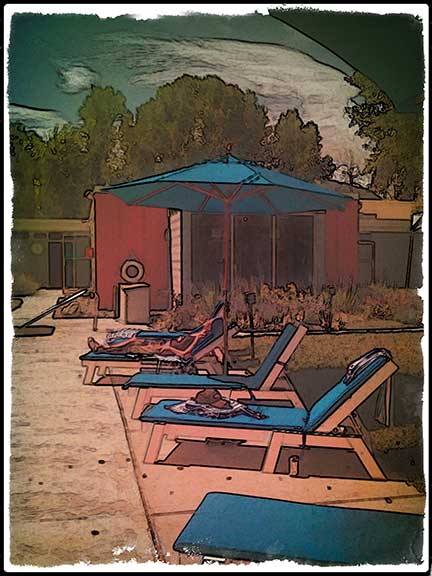
Here’s the original unremarkable capture.

Here’s that same image after an over-the-top manipulation that began in Best Camera, moved to FX Photo Studio, then to Photoshop, and finally to onOne Photo Frame. The effect is straight out of Santa Fe in the 1920s, echoing the woodcuts of Gustave Baumann.
Printing
Once satisfied with enhancements, I save unmanipulated original images only if making a demo. Otherwise I keep the enhanced file, a file for a greeting card print, and another for enlargement for gallery exhibits. I print to my Epson 4800 with matte black ink on the company’s Enhanced Matte paper, which after all these years remains an unsurpassed favorite for color and feel.
Get out there and print, show, and share. The amazing “everyman” art is here.
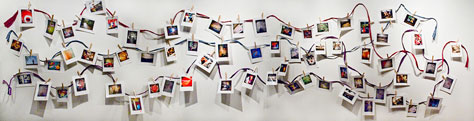
iPhone art display in my gallery, Photo Mirage. The prints are clothes-pinned to paper ropes, and purchasers simply pluck desired prints off the line.
This article was last modified on January 6, 2023
This article was first published on March 7, 2011
Commenting is easier and faster when you're logged in!

Recommended for you

Image Editing in Lightroom 5: Correcting Overexposed and Underexposed Images
The following is an excerpt from The Adobe Photoshop Lightroom 5 Book: The Compl...

Photoshop 2020 New Features
Adobe has released Photoshop CC 2020, the latest update to its flagship image-ed...
Pantone 2.0: After 45 Years, the Sequel to PMS
On September 5, 2007, Pantone announced an entirely new spot-color-matching syst...