



This tip was sent to Tip of the Week email subscribers on February 19, 2015.

Sign up now and every week you’ll get a new InDesign Tip of the Week and Keyboard Shortcut of the Week, along with roundups of new articles at InDesignSecrets and CreativePro, plus exclusive deals sent right to your Inbox!
Just scroll all the way down to the bottom of this page, enter your email address, and click Go! We’ll take care of the rest. Now, on with the tip!
When InDesign CC 2014 was released last June one of the cool new features was the ability to reverse the direction of a Find/Change search. All you had to do was select Direction > Backward in the Find/Change dialog box.
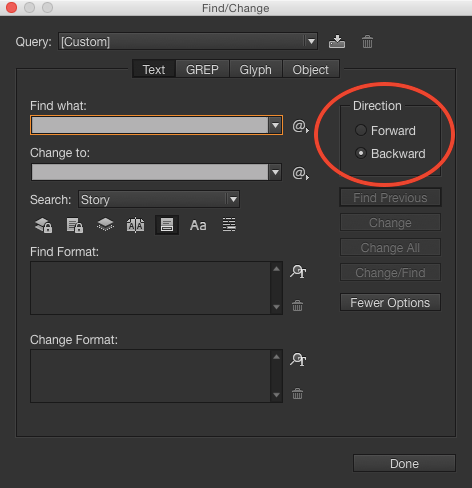
But if you’re someone who likes to keep your hands on the keyboard at all times for maximum efficiency, you might want to use a keyboard shortcut to toggle the direction of a search. And sure enough there is one: press Command+Option+Return (Mac) or Ctrl+Alt+Enter (Windows) to switch between Forward (Find Next) and Backward (Find Previous) searches.
This article was last modified on July 25, 2019
This article was first published on February 24, 2015
Commenting is easier and faster when you're logged in!

Recommended for you

Using Spring-Loaded Tools to Maximize Your Efficiency
Since today’s the first day of spring (apologies to our friends in the Sou...
Poll Results: What kinds of styles do you use on a regular basis?
The results of our poll on what kinds of styles you use and a new poll asking ab...
Tip of the Week: Gridify Magic
This tip was sent to Tip of the Week email subscribers on November 19, 2015. Sig...