



This tip was sent to Tip of the Week email subscribers on November 19, 2015.

Sign up now and every week you’ll get a new InDesign Tip of the Week and Keyboard Shortcut of the Week, along with roundups of new articles at InDesignSecrets, plus exclusive deals sent right to your Inbox!
Just scroll all the way down to the bottom of this page, enter your email address, and click Go! We’ll take care of the rest. Now, on with the tip!
I can’t play the piano, though I can tap out a few tunes on the keys with one or two fingers—sort of like I’m using a bunch of keyboard shortcuts in InDesign. And sometimes when I’m using shortcuts in InDesign, it feels like I’m playing a little tune on the piano—like when I’m using the Gridify feature to create a set of duplicate objects on the fly. While this does require more than one finger, it’s easier than playing “Chopsticks”, and for your efforts you get an instant grid of objects, you can adjust as you drag. Here’s how.
Start by selecting the object you want to duplicate.

Pause for a moment, then press and hold Alt (Windows) or Option (Mac).
Start dragging. The original object stays put and you’ll see a second copy at your cursor.

Without releasing Alt/Option, press the right-pointing arrow on your keyboard. You’ll see the bounding box of a new copy in the middle of the original object and the one at your cursor.
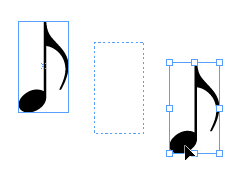
Want more copies? Press the right arrow again to make as many copies in a straight line from the original to your cursor.

If you keep adding copies, eventually they’ll start to overlap, which might be what you want for a certain effect.
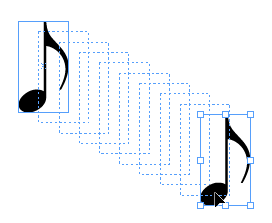
If you want fewer copies, press the left arrow key.
To constrain the set of objects to a horizontal row (or 45 degree angles), add the Shift key.

Now you can turn the single row of objects into a grid by adding more rows (to create columns). Press the up arrow key to increase the number of rows, press the down arrow to remove rows. Hold Shift to equalize the spacing in between objects.


Practice a few times and you’ll get the hang of it. You might never master Beethoven, but you can quickly fill a page with the magic of Gridify.
This article was last modified on July 25, 2019
This article was first published on November 24, 2015
Commenting is easier and faster when you're logged in!

Recommended for you
CreativePro Tip of the Week: Identifying Fonts in Photoshop
This CreativePro Tip of the Week on identifying fonts in Photoshop was sent to C...

Tip of the Week: Setting Font Preview Size
This tip was sent to Tip of the Week email subscribers on May 14, 2015. Sign up...

5 Tips for Better Tables
Use these 5 quick tips to improve the appearance and usability of your InDesign...