




This tip was sent to Tip of the Week email subscribers on June 26, 2015.

Sign up now and every week you’ll get a new InDesign Tip of the Week and Keyboard Shortcut of the Week, along with roundups of new articles at InDesignSecrets and CreativePro, plus exclusive deals sent right to your Inbox!
Just scroll all the way down to the bottom of this page, enter your email address, and click Go! We’ll take care of the rest. Now, on with the tip!
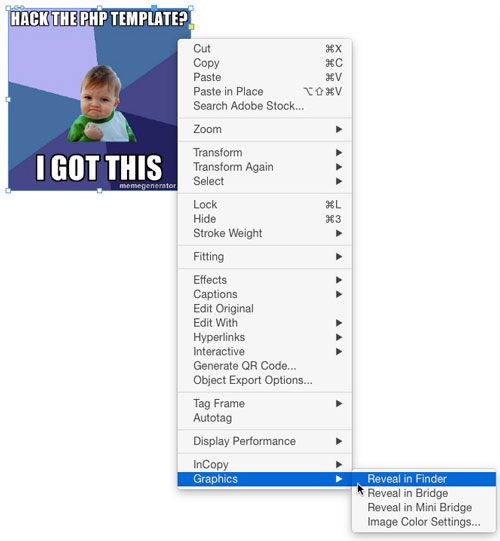
Want a super-quick way to get your hands on an image file that has been placed into your InDesign layout? Just right-click on the image (with either selection tool), and choose Graphics > Reveal in Finder/Explorer. This will open the enclosing folder and select the image.
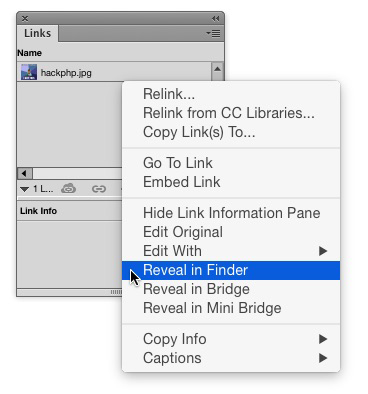
Unfortunately, you can only use this feature with one image at a time (you can’t select a bunch of images and reveal them all at once). However, you can reveal images that are unselectable because they’re locked, hidden, or not on the current spread, by right-clicking on them in the Links panel.
This article was last modified on July 25, 2019
This article was first published on June 30, 2015
Commenting is easier and faster when you're logged in!

Recommended for you
Don’t Sweat the Math—Let Photoshop Do It!
Let Photoshop—and other Adobe apps—do the math for you when entering numerical v...

Navigating and Customizing the Premiere Interface
Are you a Premiere beginner? Get started and customize your workspace with Myra...

Before&After: How to Design a Second Page
You've designed a beautiful outside. How do you follow it up inside? Simply.