



This tip was sent to Tip of the Week email subscribers on March 17, 2016.

Sign up now and every week you’ll get a new InDesign Tip of the Week and Keyboard Shortcut of the Week, along with roundups of new articles at InDesignSecrets, plus exclusive deals sent right to your Inbox!
Just scroll all the way down to the bottom of this page, enter your email address, and click Go! We’ll take care of the rest. Now, on with the tip!
Ever want to make a numbered list where each number appears above the rest of the line?

If your list has fewer than 10 items in it, you don’t have to fake it by manually typing in the numbers and adding extra paragraph returns. Instead, use a character style to position the numbers above the list items.
For the list paragraph style, specify a character style for the numbers.

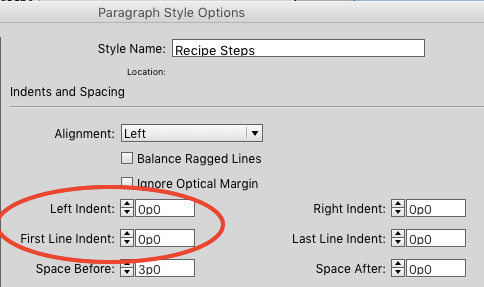
If you want everything to align on the left, remove any Left Indent or First Line Indent.
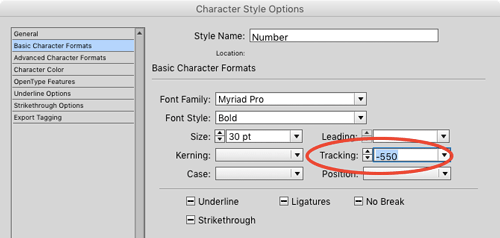
In the character style, apply a large negative Tracking value to pull the text after the numbering back to the left. This is why the trick only works with lists less than 10 items long (once you get to double digits, the numbers appear tracked over each other).

Then apply Baseline Shift to move the numbers up (you may need to then add additional Space Before/Space After in the paragraph style to make room for the numbers).


This article was last modified on July 20, 2021
This article was first published on March 22, 2016
Commenting is easier and faster when you're logged in!

Recommended for you

This Week in InDesign Articles, Number 18
A new year and a bunch of new articles, videos, and fun InDesign links!

How to Prevent Photo Loss From Your Digital Camera
Photographers’ worst collective nightmare is probably the failure of technology....

What Do the Default Sample Scripts Do in InDesign?
You probably know that InDesign ships with a bunch of cool scripts that automate...