




This set of Color panel tips was sent to Tip of the Week email subscribers on June 16, 2016.

Sign up now and every week you’ll get a new InDesign Tip of the Week and Keyboard Shortcut of the Week, along with roundups of new articles at InDesignSecrets, plus exclusive deals sent right to your Inbox!
Just scroll all the way down to the bottom of this page, enter your email address, and click Go! We’ll take care of the rest. Now, on with the tip!
Color Panel Tips
To easily switch between the RGB, CMYK, and Lab color modes in the Color panel, just Shift-click on the color ramp at the bottom of the panel. Holding down the Option/Alt key while clicking in the color ramp will affect the fill color if the stroke icon is at the front, and vice-versa.
Also, if the color you created is out of gamut, you’ll see an alert next to a small color box above the ramp.
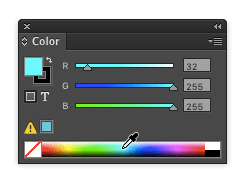
Click the alert icon to shift your new color to its nearest in-gamut neighbor.
This article was last modified on July 25, 2019
This article was first published on June 21, 2016
Commenting is easier and faster when you're logged in!

Recommended for you

Inside the Adobe Admin Console
Knowing how your IT department controls Creative Cloud apps and services can hel...

Using 3D in Affinity
Create rotatable 3D objects using Affinity and Canva AI with Steve Caplin.