



It’s time to reveal the solution—and the winner—for this month’s InDesignSecrets contest!
Here’s the question: You have a page with a three-column text frame at the top and an image at the bottom.
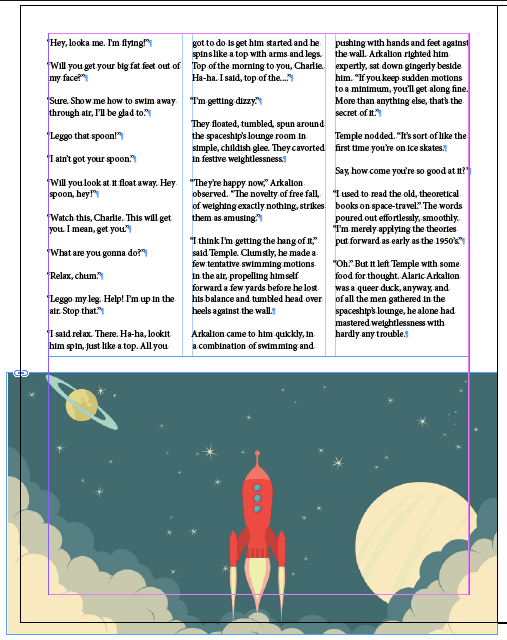
The text frame is not threaded to any others and it is nearly full with text. You’re asked by the designer in charge to delete the image at the bottom of the page and resize the text frame so the text runs to the bottom margin.
But when you do so, the text barely moves at all. It refuses to fill the new space in the text frame. What gives?
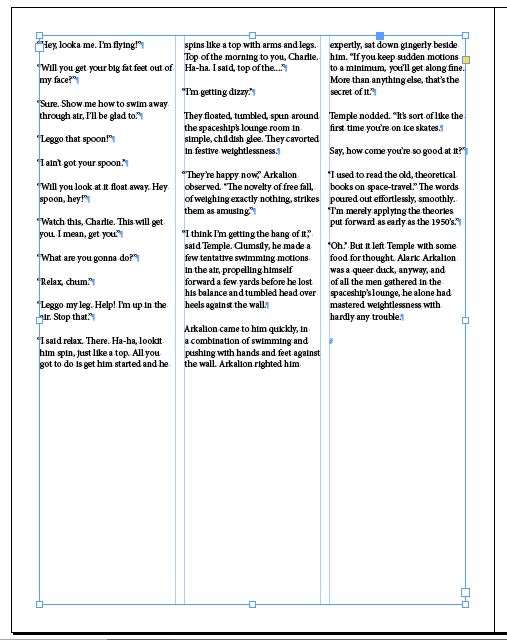
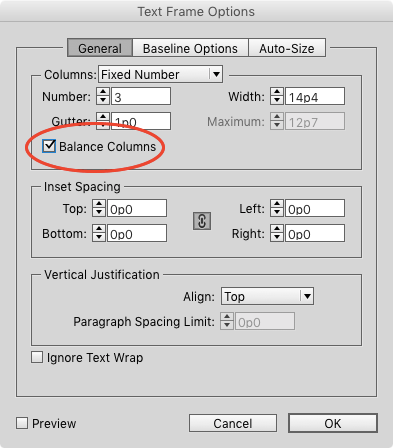
It turns out the answer to this mystery was the subject of a recent InDesign Tip of the Week. The Balance Columns feature has been enabled for the 3-column text frame. With Balance Columns turned on, InDesign makes the depths of each column roughly equal, ignoring the rest of the empty space at the bottom.
And the genius winners of this contest are…
Kate Hodge
Joe Cabrera
Both win a copy of Multi-Find/Change from Automatication!
Thanks to everyone who entered, and be on the lookout for another contest with a new great prize next month! And be sure to sign up for the Tip of the Week, if you haven’t already done so. You never know when a tip might be the key to solving a future InDesign mystery…
This article was last modified on July 25, 2019
This article was first published on November 25, 2015
Commenting is easier and faster when you're logged in!

Recommended for you

The Mystery of the Trailing Space Contest Answer and Winner
Solve this InDesign mystery for a chance at winning a great prize.
The Case of the Text on Top of the Frame Contest Answer and Winner
Solve this InDesign mystery for a chance at winning a great prize.
The Crazy Column Contest Answer and Winner
Solve this InDesign mystery for a chance at winning a great prize.