


Table Sort
Sort a table on up to three columns. Formatting can be preserved.
Oops, you’re not logged in!
Log in or sign up for a free account.


This script is part of the Tables collection. See the full collection here.
This script is part of the Type and Text collection. See the full collection here.
The script sorts a table on up the three columns, either the whole table or a selection of rows. To sort a whole table, place the cursor somewhere in it. To sort a selection of rows, select those rows. You can also indicate the number of header and footer rows which the sorter will then exclude from the sort. Any header and footer rows defined in the table are displayed in the script’s dialog.
When working on a table with formatting, the script is not particularly quick as it moves table rows back and forth, which is slow business — but, on the plus side, it deals with formatted text. Unformatted tables sort much quicker.
(For a very quick table sorter, see Marc Autret’s (free) script. His script sorts tables and text, though in tables you can’t select columns to sort on. For general table sorting, though, Marc’s script can’t be beaten.)
Use
To sort the whole table, just place the cursor somewhere in it and start the script. To sort a selection of rows, first select the rows to be sorted, then start the script.
Sort order
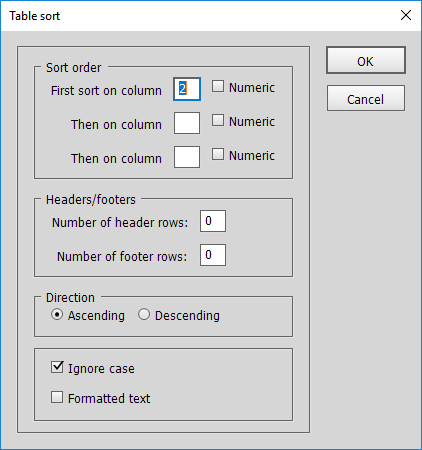
Enter the numbers of the columns that the table should be sorted on, in order. You can enter up to three columns. If any of the selected columns contains numbers, tick the checkbox after the column number. To sort the table on just one column, enter its number at First sort on column and leave the two other fields blank or type a zero there.
Headers/footers
Any header and/or footer rows defined in the table are shown in the dialog in the Headers/footers panel. If no header and/or footer rows are set in the table and you want to ignore some “manual” header/footer rows, enter the number of rows here. (When you select a number of rows before starting the script, the header/footer panel is disabled.)
Direction
Choose whether the table should be sorted in ascending (A to Z, low to high) or descending order (Z to A, high to low). If you select more than one column to sort on, the sort direction applies to all selected columns: you can’t do an ascending sort on one column and a descending one on another column.
Ignore case
The sorter can ignore the difference between upper- and lower-case letters.
Formatted text
Check this box if the table contains formatted text. Sorting a formatted table is slower. Try to use unformatted sorts whenever you can: it’s much quicker.
‘Formatting’ applies to text formatting only: cell formatting such as shading is always ignored.
A note on numeric data and dates
The script deals with numbers of all formats: decimal points or commas and commas or points as thousand separators. It does not deal with negative numbers.
Dates in numerical format are sorted fine. But the names of the months and days of the week are sorted alphabetically.
Troubleshooting
The script can’t be used on tables with merged cells. Unmerge any merged cells, then sort the table and merge the cells again. You’ll be warned if the table contains any merged cells.
Version history
1 Aug. 2021: Adjusted the sorter.
29 July 2017: All interface data are now stored and restored next time the script is run. The script’s functionality hasn’t changed.
3 June 2017: Financial data didn’t sort well. The script now ignores currency symbols so that columns with money amounts are sorted correctly.
1 February 2016: The script now checks if the table contains any merged cells and if it does, displays a warning and stops.
30 January 2014: Changed the way the script handles selections. Now, if the selection (paragraph, word, text frame) contains one table, the script targets that table.
26 January 2013: What started as a fix to a bug that caused empty cells to sort incorrectly led to a complete rewrite of the script (the interface has not changed). The bug has been fixed and the script is now much quicker.
17 November 2011: The script crashed InDesign when you tried to sort a single-column table. Fixed.
22 April 2011: fixed problem with sorting formatted text.
12 April 2011: fixed problem with very wide columns.
9 September 2010: fixed problem with “Ignore case”.
Peter Kahrel Script Repository
Hosted as a community service, and with deep appreciation, by CreativePro.com
Scripts by Topic | Script Index
Basic Script Installation and Use
How to Modify or Configure These Scripts
Resources for Scripting and Publishing Automation
About This Repository
Contact Peter Kahrel
Note to users: You run scripts at your own risk: CreativePro and the author accept no liability for anything that may be caused by any of these scripts. Always take the necessary precautions. We encourage you to save backups and test scripts on copies of your documents.
This article was last modified on September 30, 2026
This article was first published on August 8, 2026
Commenting is easier and faster when you're logged in!

Recommended for you
Index Fixes: Multiple Indexes in an InDesign Document
InDesign documents can contain only one index. But when you need more than one i...
Index Fixes: No Styling in Topic Names
Topic names cannot natively be styled in the Index panel. However, a simple solu...
Skip Style: Format First Lines in Index Sections
Apply a paragraph style to index entries that start a new letter. Optionally ins...