Mercier wrote:
is there a way without using indent to align table text in a column on “,” or “.”
Absolutely! InDesign’s tables are sneaky because they pay attention to tab stops even if you don’t have a tab character in there.
For example, you can just select a whole column (or row) in a table, open the Tabs palette (Command-shift-T/Ctrl-Shift-T), click the Decimal Align tab stop, and click in the palette’s ruler. This ensures that all the decimal points in that row will align — again, even if there are no tabs at all in the cells!
Before: No tabs in the cell
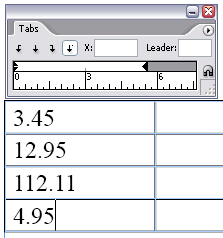
After: Decimal tab stop aligns the numbers properly

If you’re in Europe and want to use commas instead of points, select the tab stop in the Tabs palette and change the Align On field to a comma.
This article was last modified on December 18, 2021
This article was first published on November 22, 2006
Commenting is easier and faster when you're logged in!

Recommended for you

Index Fixes: Multiple Indexes in an InDesign Document
InDesign documents can contain only one index. But when you need more than one i...
Filtered File > Open Dialog Box
Here's a way to filter file types in your Open File dialog box.