




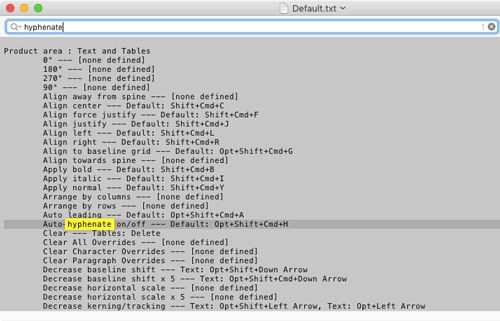
What do you do when you can’t remember a specific keyboard shortcut in InDesign? Google it? Go to the Help? One method you can use to see a list of all your current keyboard shortcuts (including any you’ve customized) is to choose Edit > Keyboard Shortcuts. You can click around in this dialog box to select menu items and commands and see the shortcuts for each. But if you click on the Show Set button, it opens a list of your shortcuts in a plain text file that you can search for elusive items.
This article was last modified on March 4, 2023
This article was first published on December 31, 2018
Commenting is easier and faster when you're logged in!

Recommended for you

10 Terrific Time Savers for InDesign
Life is busy. Work is hard. Use these tips to get more done faster.
Tips to Control Photoshop Layers
Khara Plicanic shares smart Photoshop Layers panel tips to help you find and man...
Essential Illustrator Shortcuts
Save time with Kat Kremser's cheat sheet of Illustrator shortcuts!