




This article is excerpted from the August/September 2009 issue of InDesign Magazine, #31. Subscribe to InDesign Magazine.
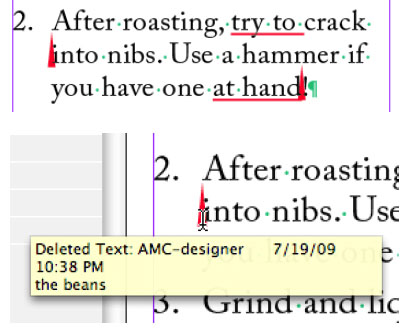
Pros: If you require text changes to be tracked in your InDesign files, CtrlChanges gets the job done and is simple to use.
Cons: Difficult to see the text in tracked deletions. Must buy pricey Pro version to see which user made certain changes.
Score: 3.5 [Editor’s note: InDesign Magazine uses a 5-point rating scale]
Adobe InCopy has a few nifty editorial features that are so useful, I’ve often wondered why Adobe didn’t include them in InDesign. One that I’ve longed for in particular is InCopy’s Track Changes, which shows you all the text edits (additions or deletions) that have been made to a story and allows someone reviewing the file to accept or reject each individual edit. Why doesn’t InDesign have that feature? After all, a lot of text editing is done in InDesign! And knowing exactly which text has been changed can be invaluable in many publishing workflows.
There is a plug-in for InDesign CS3 called Blacklining that can accomplish this. It’s been around for a while, but the problem is that the plug-in costs more than $1,000 per seat. Ouch!
Recently, the Ctrl Publishing company came out with a track changes plug-in that is far more affordable. Called CtrlChanges, it’s a plug-in for InDesign CS3 or CS4 that in some respects goes beyond InCopy’s Track Changes feature, as you’ll soon learn. In fact, the plug-in also works with InCopy CS3 or CS4 as a replacement or supplement to the program’s own track changes features.
In this review, I’ll tell you what CtrlChanges can do, where it falls short, and whether it’s worth its price: $60 for the Light version, $229 for Standard, and $549 for Pro.
Click on the image below to download the PDF excerpt:
This article was last modified on August 15, 2021
This article was first published on October 28, 2009
Commenting is easier and faster when you're logged in!

Recommended for you

Index Open Reaches 80,000 Images
Index Stock Imagery, www.indexstock.com, launched its high resolution subscripti...

Is Your File Print-Worthy?
Don’t let a problematic print file cost you money or time. CreativePro.com...

Enfocus Extends PDF Educational Focus
Extending its commitment to user education, Enfocus Software, the world leader i...