




Franck P. asked: Is there any way to find all the bullets in a paragraph and apply a character style without having to use find/change? Something automatic…
The answer can be found in nested styles, though it’s not immediately obvious how. Here’s an example of some text that he sent me:

Obviously, those little black round bullets have got to go. In CS2, you could create a nested style that would:
- apply no character style up to 1 bullet
- apply the character style through one character
- apply no character style up to 1 bullet
- apply the character style through one character
- apply no character style up to 1 bullet
- apply the character style through one character…
I think you get the idea. You do about 10 or so of these in a row (depending on the maximum number of bullets one might find in this kind of paragraph). It’s not fun, but it’s not terrible.
However, now in CS3, you can automate this quickly by adding a Repeat feature after the second rule:
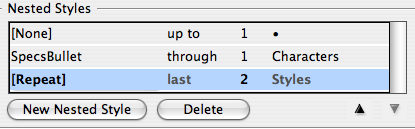
The fact that CS3 has a Repeat feature is easily overlooked, but it’s really helpful in this situation.
Of course, I first had to create a character style (which I called SpecsBullet) with the proper formatting. Originally, I was just applying a color to the bullet, but then I realized I just couldn’t stand looking at that insipid round bullet any longer. I just don’t like round bullets; I wanted a square bullet instead. I could have performed a find/change, but it seemed like cheating. Instead, I changed the definition of the SpecsBullet character style.
First I made the fill color None (which makes it disappear). Then I turned on Underline, and specced the underline as a 6-pt thick red solid line with a little negative offset to push it up into place. Here’s what I ended up with (after also changing the paragraph style’s font, color, and alignment):

You can also get some wacky effects by changing the underline style. For example, here’s what you get if you use Left Slant Hash, White Diamond, or Wavy lines instead:

Honestly, I’d probably rather use find/change to convert the bullets to the character I want, but it’s fun to see what you can do by formatting alone.
This article was last modified on December 18, 2021
This article was first published on July 6, 2007
Commenting is easier and faster when you're logged in!

Recommended for you

Interview with Sam Luo, Designer and YouTube Creator
Discover how a passion for helping fellow students led the founder of LYH Studio...

Inside the Adobe Admin Console
Knowing how your IT department controls Creative Cloud apps and services can hel...

What’s New in Photoshop 27.10
The August 2026 release brings a range of new tools and techniques—plus a comple...