




Courtney wrote:
I created a 3.5 x 5 inch postcard, but when I print, it prints significantly smaller than its actual size.
A surprising number of people email us about their InDesign or PDF pages shrinking (or growing) when they print. You figure that if something is specced as 5 inches wide in your document, it should print that size, right? Well, there are a few things that can go wrong on the way to the printer.
First, I have to get one (really basic) thing out of the way: Just because something looks 5 inches wide on screen doesn’t mean it will print that way. I know most of you know that, but every now and then someone doesn’t understand that the size on screen (even at “Actual Size”) doesn’t necessarily mean anything. As we mentioned way back in Podcast Episode 4, InDesign assumes you’re using a 72-dpi monitor. It’s a silly assumption, because virtually no one has a monitor like that. So, to check true page size, go to File > Document Setup.
The number one page shrinking/growing problem people have in InDesign is that they didn’t use the proper settings in the Setup pane of InDesign’s Print dialog box. For example, if you choose Scale to Fit, the printed version will almost certainly be different than you expect.

The same is true when PDF files grow or shrink when printed. People don’t realize that “Fit to Printable Area” (for example) means that the page will almost certainly scale the final page. Make sure the Page Scaling pop-up menu in Acrobat’s Print dialog box is set to None.
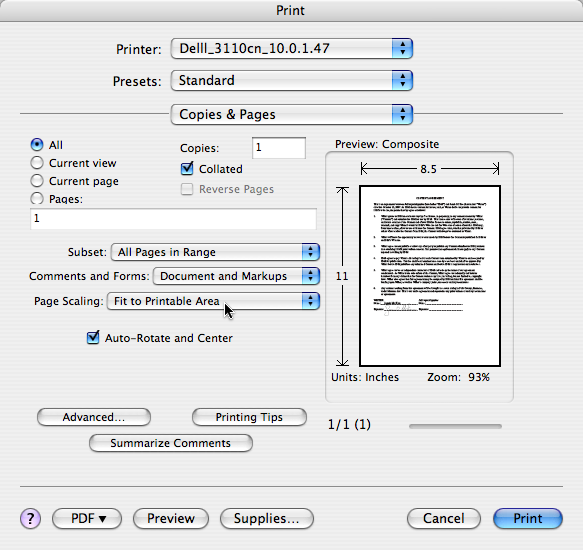
It’s possible, too, that your printer driver (or even a setting inside your printer) may be causing scaling. You can get to the printer driver settings by clicking the Printer button inside the Print dialog box (on the Mac OS) or the Print Settings button (in Windows).
This article was last modified on December 18, 2021
This article was first published on November 7, 2007
Commenting is easier and faster when you're logged in!

Recommended for you
Adobe Print Services Aims to Make Every File Print Ready
Adobe's new print technology promises to fix, enhance, and embellish PDFs automa...

Gathering Video Assets for Premiere Projects
Import, acquire, animate, and use AI to generate video content for Premiere

Index Fixes: No Styling in Topic Names
Topic names cannot natively be styled in the Index panel. However, a simple solu...