



While I never used Freehand, one of the great features I’ve read about over and over again is its ability to add text on a path to the top and bottom of an ellipse.
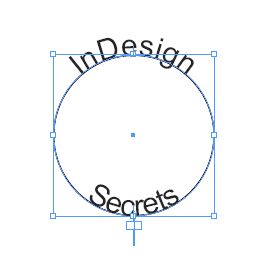
With InDesign that’s really only possible by using two ellipses and adding the top and bottom text separately.
While that fact hasn’t changed, the ease of accomplishing it has. Script writer extraordinaire, Dave Saunders has written a script that makes the process a piece of cake.
Simply draw an ellipse. Then create a text frame with two lines of text.
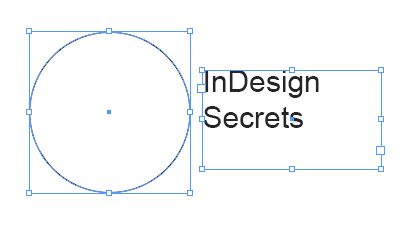
Launch the script and it will magically duplicate the ellipse and place one line of text on the top of one and the other line of text on the other.
The script can be downloaded directly from Dave’s website by clicking here.
Thanks to Dave Saunders for once again providing the community a great time saving script!
This article was last modified on December 19, 2021
This article was first published on October 17, 2008
Commenting is easier and faster when you're logged in!

Recommended for you

Make Videos Anywhere, Anytime With Adobe Premiere Clip
Video editing and production is a part of my everyday life as a content creator...

Free PDF Export Presets for MagCloud Publications
MagCloud is a print-on-demand service from HP. While it’s simple to use fo...

Changing the Language with Find/Change
Paul wrote us, Well I am still fairly new to using InDesign, but after listening...