




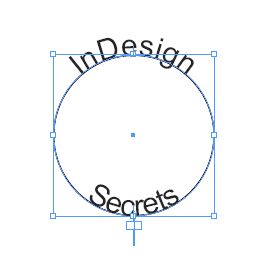
While I never used Freehand, one of the great features I’ve read about over and over again is its ability to add text on a path to the top and bottom of an ellipse.
With InDesign that’s really only possible by using two ellipses and adding the top and bottom text separately.
While that fact hasn’t changed, the ease of accomplishing it has. Script writer extraordinaire, Dave Saunders has written a script that makes the process a piece of cake.
Simply draw an ellipse. Then create a text frame with two lines of text.
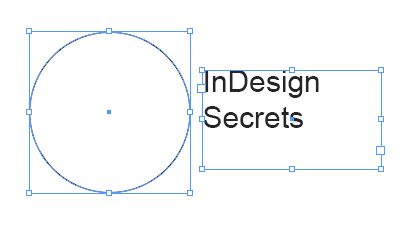
Launch the script and it will magically duplicate the ellipse and place one line of text on the top of one and the other line of text on the other.
The script can be downloaded directly from Dave’s website by clicking here.
Thanks to Dave Saunders for once again providing the community a great time saving script!
This article was last modified on December 19, 2021
This article was first published on October 17, 2008
Commenting is easier and faster when you're logged in!

Recommended for you

Index Fixes: No Styling in Topic Names
Topic names cannot natively be styled in the Index panel. However, a simple solu...
Illustrator’s Two Kinds of Type
Khara Plicanic explains the two kinds of type in Illustrator.

Nashville in Focus: CreativePro Week 2026 Photo Walks
A look at Music City through the lenses of the CreativePro community