


QuarkXPress How-To: Add More Style to Your Pages



This tutorial is provided by Against the Clock.
Maybe you’ve been meaning to try style sheets. Or maybe you’ve ignored them because, dang it, you’re a creative designer, not a mechanic! But using style sheets doesn’t make you any less creative — in fact, it automates grunt work so you have more time for the fun stuff.
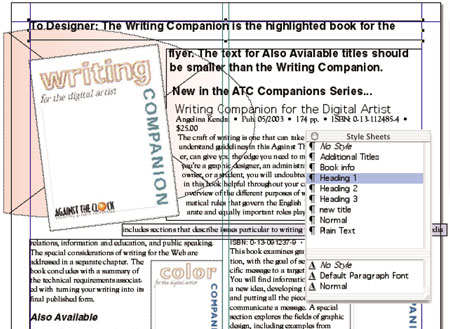
Style sheets make jobs such as this one a breeze to format.
In this how-to, you’ll not only get simple directions for applying style sheets, you can even follow along using the supplied XPress document, fonts, and pre-made styles. We guarantee that by the end of the article, you’ll be more efficient and your text will be more consistent.
We’ve posted this tutorial as a compressed folder that contains a PDF file, fonts, styles, and an XPress document. Just click the link “StyleSheets.zip” to download the folder to your machine, and then double-click it to uncompress all the items within the folder.
To open the PDF, you’ll need a full version of Adobe Acrobat (5 or higher) or the Adobe Reader, which you can download here:
 .
.
To learn how to configure your browser for viewing PDF files, see the Adobe Reader tech support page.
This article was last modified on January 10, 2022
This article was first published on August 31, 2005
Commenting is easier and faster when you're logged in!

Recommended for you

The Peter Kahrel Script Repository Gets a CreativePro Makeover
Peter Kahrel is one of the most prolific and influential InDesign scripters of a...

Making Tables Accessible
Learn how to correctly tag complex PDF table headers for screen readers with Dax...

Merge Ahead: Choosing the Right Tool for Variable Data Jobs
Which tool will smooth the road for the variable data that drives your customize...