



JR writes:
I am a yearbook adviser at a high school. One of the annoyances I am constantly faced with is when we have an element on the page that is not intended to be a text element, yet when my students or I inadvertently click on it with the type tool, InDesign converts the element to a text frame. UGH! Why does it do this and how can I prevent it?
JR, this is a “feature” of InDesign that people generally love or hate. While I enjoy InDesign’s ability to be able to change any frame into a text frame just by clicking inside it with the type tool, it can be annoying if you don’t expect this behavior. In order to turn this “feature” off, you will need to edit your preferences.
On a mac: InDesign menu > preferences > type
On a PC: Edit menu > preferences > type
Inside the Type Preferences be sure to un-check the second item in the list to turn off “Type Tool Converts Frames to Text Frames”. This will prevent your type tool from converting your frames into a text frame when you type inside them.
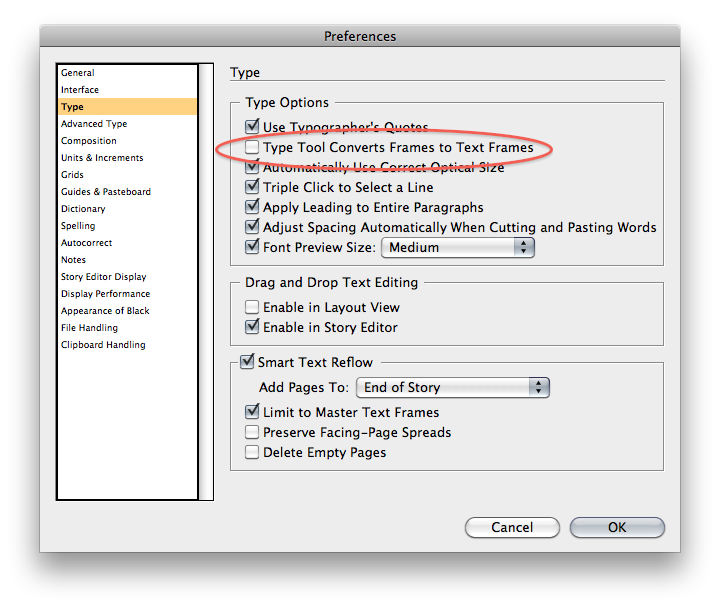
Remember that if you want this to be a global preference be sure to edit this preference without any documents open.
This article was last modified on December 17, 2022
This article was first published on November 23, 2009
Commenting is easier and faster when you're logged in!

Recommended for you

How to Create Dotted Lines in Illustrator
Learn how to create a dotted line in Illustrator by setting the gap amount and h...

Shortcut for Opening and Closing Side Panels
Jim wrote: I love the new panels in InDesign CS3. However for some they may be t...

Breaking Underlines for Descenders
If you’ve ever tried to design type with underlines, you may have run into...