


InDesign Template Essentials: Preflight Profiles
This is a batch of Preflight Profiles to help you spot and fix potential problems before you output your documents. In all, there are 21 profiles, customized for different needs and...
This template has a batch of Preflight Profiles to help you spot and fix potential problems before you output your documents.
In all, there are 21 profiles, customized for different needs and output requirements for print and digital projects. For example, there’s a “Better Basic” profile that is great for everyday use, with several improvements over the default profile that ships with InDesign. There’s also a “Design Manager’s Best Friend” profile that flags the common small mistakes we all make that can turn into big headaches if they’re not dealt with early on.
In the print category, you’ll find profiles for 1-color jobs, CMYK jobs, and combinations of CMYK+ spot colors. In the digital category, there are profiles for reflowable EPUB, interactive PDF documents, and more. There’s also a batch of OHWs: One Hit Wonders, that target specific problems you may need to deal with, like RGB images, low-res images, transparency, and others.
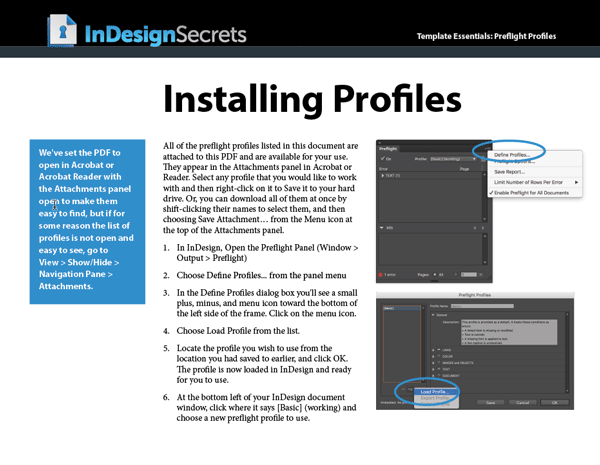
A handy instruction sheet for adding the profiles to InDesign is also included.
Remember, to err is human, to preflight, divine.
Commenting is easier and faster when you're logged in!

Recommended for you

How to Make a Solid Gold Ring With Photoshop
When a Welsh friend wanted to propose to his girlfriend, he thought it would be...

Heavy Metal Madness: Making Copies from Carbon to Kinkos
During a recent session teaching one of my young nephews about email, he asked m...

New Contest! The Mystery of the Fickle Folio
Solve this InDesign mystery for a chance at winning a great prize.