




I’ve been working with multi state objects (MSO)s for quite sometime now and one of the things I’ve found with larger MSOs (those with five or more states) is that it can be a pain to identify them with their simple default names of “state 1,” “state 2,” etc. True, you get a thumbnail, but if the states look similar it can be a bit difficult to tell them apart. This is especially important when creating “go to state” buttons.
Of course, after the MSO has been created you can rename the states but quite frankly, I’ve found working with the object states panel to be something I try to avoid. So, here’s a better way and it starts in the layers panel which is much easier to work with. In the screen shot below you can see that I have three groups and in the layers panel they all have the default name of <group>.

Not very helpful and when I convert those objects to an MSO I wind up with the generic state names I mentioned earlier:
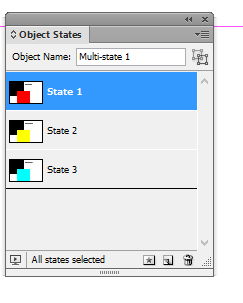
Again, not real helpful. But what I’ve discovered is that if you rename the groups in the layers panel like this:
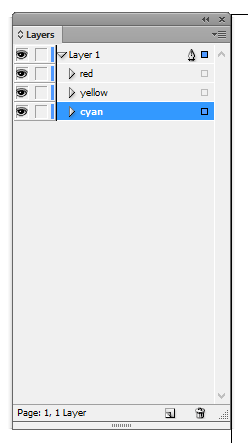 and then create the MSO, you get this:
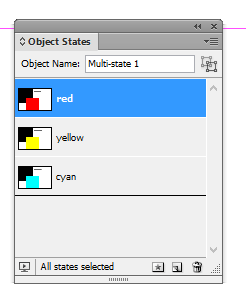
Much better.
Obviously this is a very simplistic sample. I’ve worked with MSOs containing more than 40 states and there’s no easy way to navigate through that the Object States panel and with the Layers panel you don’t really need to worry about what is and what isn’t selected.
This article was last modified on December 30, 2021
This article was first published on May 23, 2013
Commenting is easier and faster when you're logged in!

Recommended for you

How to Balance Text Columns Automatically and with Baseline Grid
Bring balance to your InDesign spreads with this Text Frame Option.
Create Flawless Fractions with OpenType
Choose your font carefully if you need flawless fractions!