



This article courtesy of Design Tools Monthly. For a free sample of the printed newsletter, email in**@**********ls.com.
Quickly Replace an Object’s Color
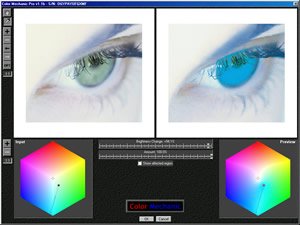
Digital Light & Color’s Color Mechanic Pro ($50) is a plug-in for Photoshop that makes it easy to realistically replace an object’s color with another color. It’s quick and it works.
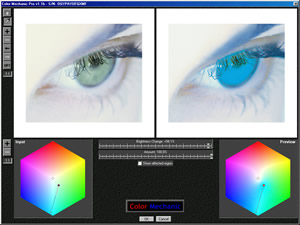
To adjust a color, click on it in the left-hand image. You’ll then see a control point in the color hexagon. Drag the control point to the new color (see right-hand result).
Colorful Photoshop Plug-ins
Look for two plug-ins from Pixel Genius. PhotoKit 1.2.3 ($50) is a plug-in for Photoshop 7 and above that replicates 141 analog photographic effects, including warming and cooling filters, toning effects, film grain, and color-to-grayscale conversions using colored filters. The results are spectacularly professional.
PhotoKit Color ($100) is a plug-in for Photoshop 7 and above that automates color correction and balancing and helps with creative coloring. Its simple interface gives you control over split toning, color overlay, RSA correction, simulating processing film negatives and more. You can enhance common color such as skin tones, skies, and automatically remove color casts. Their website shows professional-quality examples of applying the effects.
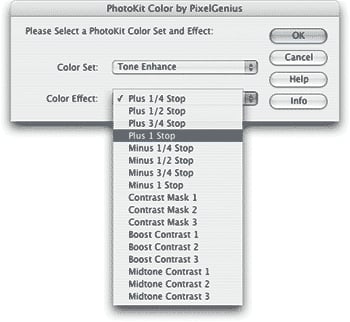
When a photo is dark, try lightening it by choosing the Tone Enhance Set and selecting the Plus 1 Stop PhotoKit Color effect.
Reduce Noise & Grain
Kodak’s Austin Development Center has released Digital Gem Pro ($100), a plug-in for Photoshop that removes visual noise from scans and digital photos. It’s effective on the noisiest images, but many photographers use Digital Gem to remove noise from their high-quality images. The Web site has a free set of effective Photoshop actions.
Reclaim Image Details
Akvis Enhancer 1.2 ($69 to $78) is a plug-in for Photoshop that pulls detail out of shadows and highlights. It can dramatically improve most photos, especially those in which strong light falls behind your subject, casting a shadow. Besides enhancing details in shadows and highlights, Enhancer can also improve details in a photo’s midtone areas, making it an effective tool for sharpening an otherwise well-exposed photo. Because of the algorithms Enhancer uses, it’s also extremely effective at removing the haze that sometimes covers a photo, which is usually the result of non-optimal camera settings.
Crop Marks in InDesign
Cacidi Systems’ $25 Cropmarks 3.0 is a plug-in for Adobe InDesign CS2 that automatically creates crop marks around selected item(s). You can control length, offset, and weight of the crop marks. You can download a fully functional version that works for two weeks from the company’s Web site.
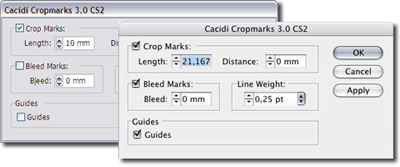
Cropmarks’ interface is simple.
Attach Scripts to Events in InDesign
RogueSheep’s $80 InEventScript 1.0.2 is a plug-in for InDesign CS/CS2 or InCopy CS/CS2 that lets you assign any InDesign script to any user event, so that the script automatically runs when a user performs a specified action. For example, you could create a script that warns of overset text, then attach it to the Print… event. Or create a script that exports text when a Save is performed. The possibilities are nearly endless.
Import HPGL Files into InDesign
Knowbody’s HPGL Import ($99 per year) is a plug-in for InDesign that converts files exported from 3D design programs into Illustrator files, which are then automatically imported into InDesign. If the original file is modified, the Illustrator file is updated as well. Currently, it only supports a subset of the HPGL command list, and will warn you if a file contains unsupported commands. You can, however, control the pen width.
Quark’s New Math XTension
XPressMath from Quark is a $259 XTension for QuarkXPress 6.5 that lets you typeset complex mathematical formulas and equations directly in QuarkXPress. In addition to providing a relatively simple interface for building the equations, you can edit existing equations in a WYSIWYG window. You can also use a style-sheet-like system to ensure that all equations in a project share a similar appearance. If you want to try before you buy, download the free, limited-feature version.
Database Integration for QuarkXPress
DATAformXTension ($1,100) from Gassenhuber is a versatile database tool for QuarkXPress 3, 4, 5, and 6. DATAformXTension works with your database file to either build new XPress documents or push information into existing XPress documents. Data from the XPress document can be exported back to the database, too. Document properties, text box position and properties, picture paths, scaling properties, and more can all be imported into a database, making it easy to build catalogs and other structured documents on the fly.
This article courtesy of and copyrighted by Design Tools Monthly. For a free sample of the printed newsletter, email in**@**********ls.com.
This article was last modified on January 18, 2023
This article was first published on July 15, 2005
Commenting is easier and faster when you're logged in!

Recommended for you

Placing Items on an Irregular Surface in Photoshop
Placing items on an irregular surface, such as grass or sand, will only look nat...
Creating a Panorama: Photoshop, Camera Raw, or Lightroom?
When a scene is wider than your widest lens, merging images into a panorama is a...

CreativePro Video: How to Use Camera Raw in Photoshop
In the following CreativePro video, Michael Ninness shows us how to use Camera R...