



There’s plenty of diversity among InDesigner users. We come in all colors, ages, shapes, and sizes. But until Adobe launches Creative Cloud for Pets, we all have one thing in common: we’re all human.

We all make mistakes and cut corners at times. We all can be lazy or careless. We all “cheat” to make a deadline, at least once in a while. The trick is to not accumulate too many bad habits and leave a bunch of defects in our files that will eventually come back to haunt us (or the next poor slob who inherits our files).
Case in point: take a look at your Links panel. Are the links all organized in their proper folders, or are some lurking on your Desktop or in the Downloads folder? Are some on a removable drive which as soon as it’s unplugged will leave your layout with a mess of missing links? Got a few in “Untitled Folder-17” or “Desktop Crap”? I thought so. But if your links are in disarray, don’t despair. You can collect them all in the proper folders with one simple command called Copy Link(s) To.
For example, if you wanted to gather all logos into an existing Vector Art folder, just select them in the Links panel (Command/Ctrl-click or Shift-click to select multiple items).

Then from the Links panel menu, choose Utilities > Copy Links To… or just right-click and choose the same command, and navigate to the Vector Art folder.

Click Choose in the dialog box, and boom, fresh copies of all the selected links are now in the Vector Art folder, and the links in your InDesign document are updated.

The original copies of the art are left untouched, so this trick won’t clean up your hard drive, only your InDesign files and bad habits. Now if only there were InDesign commands to remind you to floss or stop biting your nails…
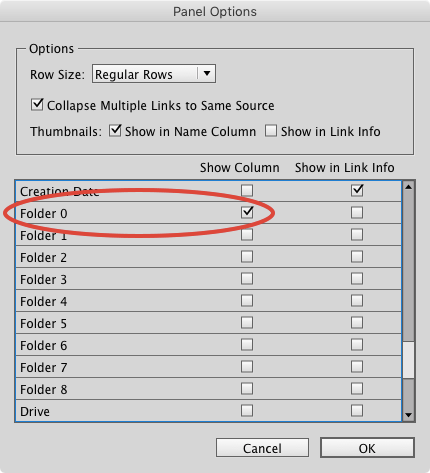
Bonus tip: if you want to see the current folder where your linked files reside as a column in the Links panel (as in the screenshots above), go to the panel menu and choose Panel Options. Then click the checkbox next to Folder 0 (Folder 1 is the next level up in the file directory and so on).
This article was last modified on July 25, 2019
This article was first published on March 6, 2017
Commenting is easier and faster when you're logged in!

Recommended for you

Copy all your linked images
Keith takes a "deep dive" into the "Copy Links To" command and reveals some deta...

Tip of the Week: Fast Edit Original
The fastest way to open a placed image in another application for the purpose of...