



I am not opposed to AI. I use it, I value it, and I can see where it belongs. But Adobe’s Generative Alt Text feature in InDesign crosses a line that should never be crossed in professional production software.
The problem is not just that AI-generated alt text can be wrong, though it can be. The problem is that InDesign can insert or replace text inside a live production document without the user approving that specific change. That is not assistance. That is editing. And when software edits production files by default, trust begins to collapse.
This is a complaint about file integrity, not bad AI output. Generative Alt Text treats accessibility text as harmless metadata when it is downstream content relied on by people who cannot see the image. Changing it by default is an unauthorized edit to the file that can damage your accessibility workflow.
InDesign UserVoice
I filed a feature request at Adobe UserVoice to turn these features off by default. I did not ask Adobe to remove AI or abandon accessibility. I asked for professional control—the option to generate descriptions for all images, or for selected images, only when requested, and to approve them case by case.
Adobe’s response was that Generative Alt Text is an opt-out experience, “ON by default,” and that users are told the first time an image is placed. The request was closed as “Resolved For User” and “As Designed.” That is exactly why this matters. “As designed” is not a defense when the design lets machine-generated content enter production documents by default. The objection was never that the feature failed to work as designed; it is that this should never have been the design.
Version Tested
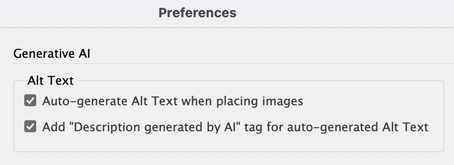
My findings are based on using Adobe InDesign 21.4.1. The Alt Text preference appears under InDesign’s Generative AI preferences. When enabled, InDesign will automatically generate alternate text for placed images and add the phrase “Description generated by AI.” In my testing, the feature can affect live document content during normal actions such as placing or relinking images.
What the Feature Is
Generative Alt Text uses AI to generate descriptions for images placed in InDesign. On paper that sounds useful, since many documents have missing alt text and many users do not know how to write effective alt text. But a generated description should only ever be a suggestion. It should not be written into the document automatically, treated as approved, or used to replace user-written content, and it should never enter production files unless the user has clearly and deliberately asked for it.
This Is Not Just Metadata
One of the most worrying parts of this debate is the assumption that alt text is “just metadata.” It is not. Alt text is accessibility content. It can be exported into PDFs, EPUBs, and HTML; read aloud by assistive technology; reviewed by clients; checked in audits; translated; and built into regulated publication workflows. It may not be visible on the page, but it is still content. InDesign users would revolt if the program suddenly started inserting generated text into visible text frames by default—and silently overwriting existing text.
In this regard, the alt text feature completely violates the spirit of accessibility, treating the content consumed by people using assistive devices as more disposable than content for sighted users.
Accessibility Is Not a Place for “Any Old Text”
Bad alt text does not advance the cause of accessibility. Incorrect alt text misleads people who rely on assistive technology, vague alt text removes useful meaning, and plausible but incomplete alt text creates a false sense that accessibility has been handled. That is dangerous because AI descriptions often sound reasonable.
Take this example, where the generated alt text is: “A vibrant cosmic scene showing a glowing red spiral galaxy partially transitioning into a blue and purple star-filled space background.”
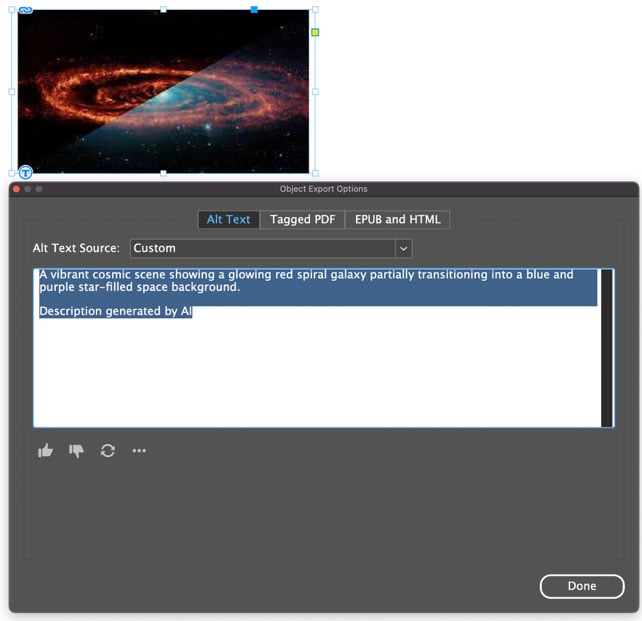
That might sound fine at first. But what if the document needs the actual name of the galaxy, or the telescope, observatory, photographer, source, date, or scientific context, because the point is that it documents a specific object, event, process, or publication? The AI cannot know that from the image alone. Good alt text depends on the purpose, context, and audience for the image. A generic visual description can be fluent and still completely wrong for the image.
The Real Issue Is Consent
This feature should be off by default—not buried in preferences, not enabled after a single prompt many users will miss, and not re-enabled after preferences are reset. If users want AI-generated alt text, they should invoke it themselves: for one image, for all images, or through a review panel, with the ability to approve, edit, reject, remove, or audit each result.
What Adobe built is backward. It lets AI content enter the document first, leaving the user to find and fix it later. Professional production depends on control, approval, repeatability, and trust. In its current state, InDesign’s Auto-generate Alt Text feature undermines all those things.
The Overwriting Behavior Is Potentially Disastrous
The most alarming behavior I found is that custom alt text is replaced when an image is relinked. That alt text may have been carefully written and approved by a client, reviewed by an accessibility specialist, localized by a translator, and signed off by a legal or regulatory team—all of it wiped out silently, with no warning that the document had changed.
The problem can get worse if you undo/redo after relinking. The image and the alt text may fall out of sync: The image changes, but the description still refers to the previous image.
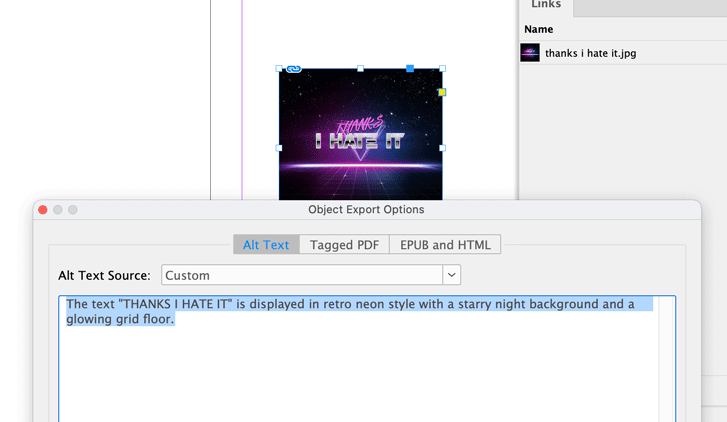
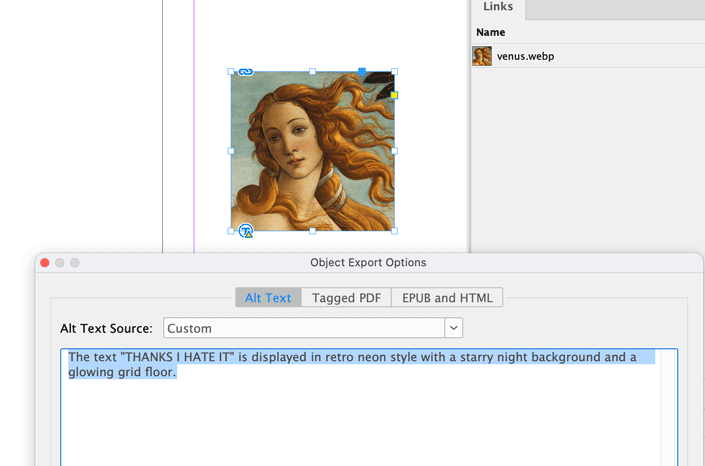
InDesign may show an Alt Text badge with an exclamation mark to flag the mismatch, but there are several common features that will hide the badge:
- Hide Alt Text Badge
- Hide Frame Edges
- Preview mode
- Overprint Preview
In any of these scenarios, your document can carry incorrect accessibility content with no visible warning.
This means approved accessibility content is no longer stable. You cannot fully trust that a document you checked yesterday still holds the same content today, and your client cannot trust that the descriptions are unaltered. So, you need another round of checking and approvals—the opposite of the efficiency AI is supposed to deliver.
It Erodes Trust at Every Level
When software inserts or replaces content by default, trust weakens at every level—Adobe altering files without instruction, clients receiving unapproved machine-generated content, reviewed descriptions no longer staying reviewed, translated source content changing, regulated files slipping out of control, and final files no longer being “final.”
It creates doubt: Did a human write this or did the AI add it? Did the client actually approve it? Was it changed after the fact when an image was relinked? Did the feature turn itself back on after you reset preferences? Those are not questions we should have to answer in professional publishing workflows.
“As Designed” Is Not a Defense
Adobe’s response that this behavior is “as designed” is part of the problem. The complaint is not that the feature is malfunctioning; it is that the design itself is wrong. A design that lets generated content enter production documents by default, lets approved alt text be overwritten without confirmation, or treats accessibility content as a convenient place to push AI adoption is wrong by design.
What Adobe Should Do
This is a problem that can be solved. Here is how the Auto-generate Alt Text feature could be fixed:
- Turn Generative Alt Text off by default.
- Never overwrite existing alt text without explicit confirmation.
- Make generated descriptions suggestions rather than inserted content.
- Provide a convenient way to find, review, edit, and remove AI-generated alt text across a document.
AI Should Assist, Not Alter
This is not anti-AI, and it is not anti-accessibility. It is about professional control. AI can help us be more efficient, but it should not become an uninvited author inside production documents. And it should not rewrite accessibility content as though any text is better than none.
The problem is not only that the AI can be inaccurate; it is that Adobe has allowed AI to change our files without our permission. That is unacceptable—especially if Adobe wants professionals to trust AI inside our production tools.
If you agree, please go to the Uservoice page, vote on the request, and share your thoughts in the comments here.
This article was last modified on June 25, 2026
This article was first published on June 25, 2026
Commenting is easier and faster when you're logged in!

Recommended for you

CreativePro Week 2026 Preview: 6 Auspicious AI Sessions
Six sessions to help you put artificial intelligence to genuinely intelligent us...

Batch-Process (Convert/Export/Import) Documents
Export documents by the folder to PDF, IDML, (INX), JPEG, PNG, RTF, or package t...