



When I spoke at the Chicago InDesign User Group last week (theme: Tips and Tricks … how could I resist?), the hit of the evening was my demo of InDesignProxy, the free utility from Rorohiko for Mac users with two or more versions of InDesign installed. Bob Levine wrote about it a couple months ago, but now I’m happy to tell you that developer Kris Coppieters just released an update, InDesignProxy 1.06, that makes it even better!
Check out this screen shot from my Mac:
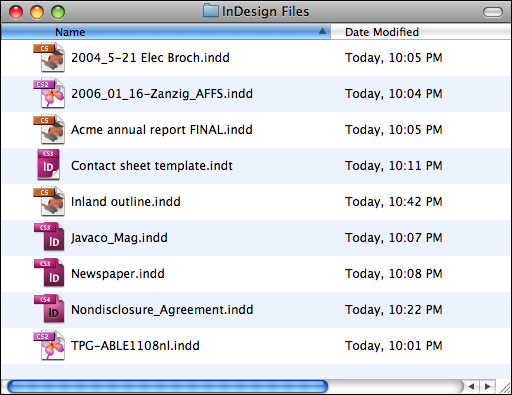
You’re looking at four different versions of InDesign icons in the Mac Finder: CS1 (the monarch butterly), CS2 (the pink butterfly), CS3 (white letters), and CS4 (black letters). I can double-click any of them and they automatically open in the correct version on my Mac, booting up on the fly if necessary. If I don’t have that version installed (I actually don’t have CS1 or CS2 on this computer), the file opens in the earliest version I do have–in this case, CS3, just as I want it to. How’d I make that happen?
I just made InDesignProxy 1.06 the default program for all INDD files on my computer. In case you’ve never done this (changed the default application), just select any INDD file in the Finder and choose File > Get Info. In the Open With section, choose the InDesignProxy.app from the dropdown menu.
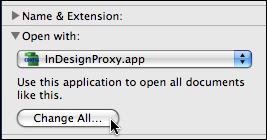
Click the Change All button, and then in the subsequent “Are you sure?” alert, click OK. From then on, all INDD files open in InDesignProxy by default, which silently and immediately shoos them over to the correct InDesign version.
Now, the InDesign file icons in the Finder don’t change instantly; in fact you’ll probably see them all change to InDesignProxy’s own bright green icon. But as soon as you double-click one, it opens in the correct version of InDesign, and from then on it gets the correct icon throughout the operating system. (See a tip for removing the proxy icons without opening the files first at the end of this post.)
Actually, much of this ability was possible in earlier versions of InDesignProxy. You could make it the default application for INDD files, but that meant a file would get the utility’s green icon permanently as soon as you opened it. After the user group demo, I emailed Kris to share the good news with him about how excited people got about it, but of course had to insert some gentle whining about the green icons if you wanted double-clickability (and the fact that it wasn’t working reliably with InCopy files). Being the cool guy that he is, he spent the weekend adding the new “smart icon” feature, as well as solid support for InCopy CS1 through CS4 file formats (INCD, INCX, and ICML).
So, if you’ve got an older version of InDesignProxy, get over to the Rorohiko InDesignProxy page and download v1.06, and if you haven’t tried it yet (and you’re a Mac user with multiple versions of InDesign and/or InCopy installed and would prefer to stay sane), do yourself a favor and start using it. It’s “cup of coffee-ware” … he asks for a $4.00 donation if you find it useful. (The Donate button is on the InDesignProxy page. Please use it! We want to encourage Kris to continue spending his weekends catering to our every InDesign need.)
Okay here’s the tip, also courtesy of Kris. A feature that InDesignProxy has always had (and still does) is that after setting it as the default app for INDD files, you could Option-double-click an INDD file in the Finder, and you’d get this dialog box, letting you choose a specific version of ID or IC for that one file that one time:
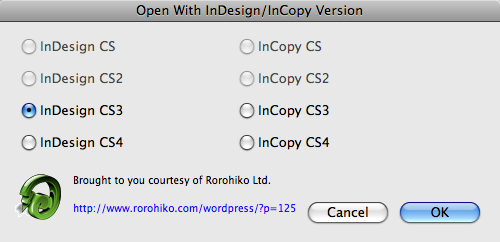
Kris says that with InDesignProxy 1.06, if you click Cancel in this dialog box, the file(s) you had selected won’t open, but they’ll immediately get the correct InDesign version icon applied. It’s a fast way to clean up a slew of temporarily green icons and see immediately which InDesign versions they truly are.
This article was last modified on December 19, 2021
This article was first published on January 19, 2009
Commenting is easier and faster when you're logged in!

Recommended for you

Tip of the Week: Using Discretionary Line Breaks
How to use discretionary line breaks to avoid bad breaks when using en spaces an...

Editing the Default New Document Preset
What if the majority of the layouts that you create in InDesign don't require fa...

Berthold Releases Akzidenz-Grotesk Next
Berthold introduces a new interpretation of Akzidenz-Grotesk: the original sans...