


InFocus: Resources for Book Design and Production
Cool stuff for InDesign users to help with book design and production, including scripts, fonts, free images, legal advice, and video instruction.


This article appears in Issue 105 of InDesign Magazine.
How many times have we been told not to judge a book by its cover? How many people comment on which particular font was used in the book they’re currently reading? And how many professionals get to call it “work” while they’re looking at gorgeous photos and art? As designers, we have probably experienced each one of these things even more often than we’ve been told “I swear this is the last edit.”
Since we are all about books in this issue of InDesign Magazine, this edition of InFocus is brimming with goodies for many of the steps along the way to creating a great book. Start with a little inspiration, add in great design and some production tools, mix in client proofing, and finish up with getting your creation out into the world, and you have the recipe to creating that book.
Edward Gorey: His Book Cover Art & Design
If you’re an Edward Gorey fan—and you might be without even knowing it—you might not know about his life before he became a famous author and illustrator of off-beat, macabre tales. Prior to his fame, he toiled for the likes of Doubleday and Random House designing book covers and adorning the interior pages with his illustrations. As proof that one’s time in the trenches pays dividends, Edward Gorey: His Book Cover Art & Design showcases some of the best and most memorable contributions he made to book cover design. Most of the covers in this volume are given a full page to fully highlight the detail in Gorey’s work.
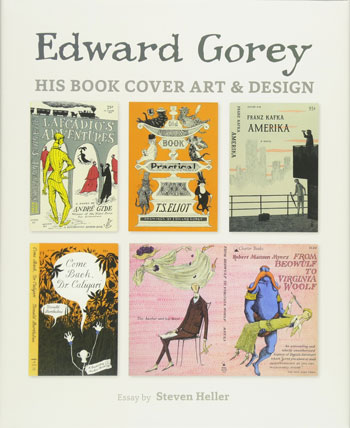
You can definitely see hints of classic Gorey style in those covers that feature the tall, lanky,
often pointy human figures he is so well-known for. And while I remember thumbing through T.S. Elliot’s Old Possum’s Book of Practical Cats in high school (mostly because it was the basis of the budding Broadway hit, CATS, at the time), I had no idea the illustrations on that re-issue were by the same man who created The Gashlycrumb Tinies. The titles covered in this 128-page volume range from the mundane, such as Nineteenth Century German Tales to more Gorey-worthy titles of fantasy and wonder, like War of the Worlds. The book’s cover is set in the official Gorey font based on his own handwriting.
Book Cover Design Inspiration
You can never have too much creative inspiration, right? Here’s one such source especially for book cover designs. The editors of HOW Magazine have put together a free download—a smattering of wise advice and inspiration from their editors—to get those creative juices flowing. The free 17-page PDF (an edited-down version of what appeared in the magazine) includes articles chock full of advice and a cornucopia of tasty book covers. Whether you just want to ogle the covers, draw inspiration from them, or get practical advice on book cover creation, the PDF is available for the price of your email address.
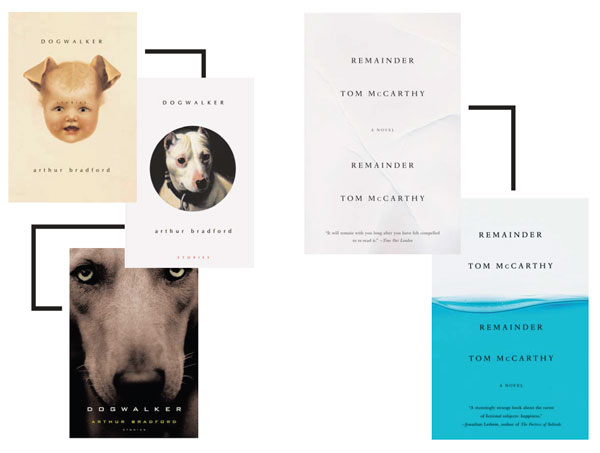
The included articles showcase painted covers, highlight an interview with Paul Buckley, Penguin Books’ Art Director, and discuss the seductive qualities of romance novel cover design (hint: think abs and kilts!). The most interesting and insightful piece has to be the “Kill Your Darlings” article. It focuses on eight books and their initially rejected covers. They profile the cover art for Dogwalker, which went from a slightly frightening yet compelling baby-dog hybrid to a classic dog painting to a dull-but-safe close-up of a dog. The original cover for Send (about email etiquette) was cast aside due to worries that it might be too racy to display in chain bookstores. Strange though some of the examples are, they help prove the point that a good book cover should get your attention one way or the other.
Blurb’s Blog
If you’re not familiar with Blurb, get thee to their website posthaste (after you’ve finished reading InDesign Magazine, of course). Blurb is a self-publishing and marketing platform, offering tools such as output services and an InDesign plug-in for creating that perfect book. But they also have a blog which can be a helpful source of inspiration, even if you don’t ever use their publishing services.
The blog is divided into topics such as creativity and how-tos. The former category sports posts—often by guest authors—such as “Five Rules to Remember When Digital Storytelling.”
The how-to offerings include tips for creating a wedding photo album and how to migrate your stories from blog posts to a physical (or digital) book. More practical but no less inspirational are their primers on offset printing vs. print-on-demand. If you’re looking to give your self-published book a little push, Blurb just might be able to lend a hand.
Exchange Typeface
I am open and honest about my inability to name fonts on sight or distinguish the difference between two very similar ones. But—much like my love of classical music—I know what I like. Such is the case with Tobias Frere-Jones’ new-to-us Exchange typeface. Originally designed as a commission for The Wall Street Journal in the early 2000s, the type designer extraordinaire added to the original Exchange offerings and released the 18-font family earlier this year. Like his recent Retina typeface release, Exchange includes a subset dubbed MicroPlus for use in captions and smaller onscreen text. Exchange’s eight MicroPlus fonts feature increased x-height, larger caps, and looser spacing to retain legibility at those smaller sizes, often displayed on less forgiving surfaces.
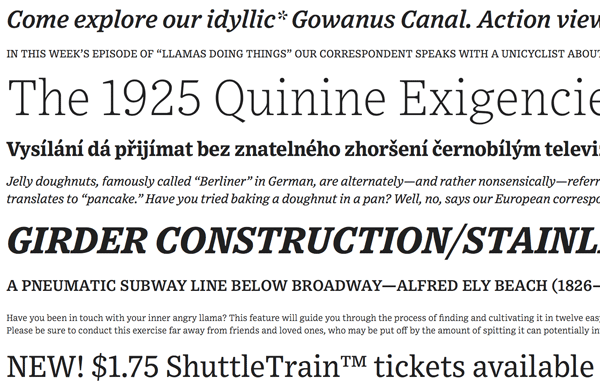
And because Frere-Jones is also a type historian, even someone like me can enjoy the history of how this typeface came to be. For this serif font, he took cues from Ionic, a precursor to slab serif, which sort of married each character to the next by way of those larger serifs. And though Ionic was first used in the 19th century, both typefaces are confronted with the problems of spread presented by printing on newsprint. Enter Bell Gothic from the 1960s: a sans serif font created for tiny print in phonebooks (remember those?). Frere-Jones took the internal stylings of Bell Gothic, like higher x-height and larger counters, and crafted those into Exchange. What was born from these spiritual parents separated by a century and a half was a typeface with the best characteristics of each, purpose-built for the less-than-forgiving surfaces they’ll be viewed on.
Drawing Inspiration from Nature
If you’re looking for images of the varied flora and fauna that inhabit this big blue marble we live on, then you’ll need to head over to The Biodiversity Heritage Library’s Flickr streams. Yep, I said streams, plural. Their original Flickr collection is quickly approaching 125,000 photos and illustrations taken from the pages of their massive collection of books. All of BHL images are in the public domain, so you can expect that they are more of the “vintage” variety. But the diversity and quality is no less impressive. The BHL’s original collection is curated and carefully sorted into collections such as “Ancient Egypt,” “Animals of Myth and Legend,” and my personal favorite, “Halloween.”
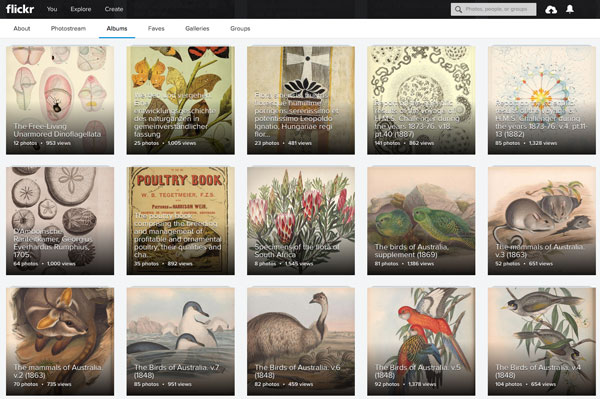
If 125,000 images sounds overwhelming, hold on to your proverbial hats, because you can also search through their unofficial collection of over two million images. While not exclusively their collection—and certainly possessing no real categorization—this megacollection is comprised of images tagged for the BHL Collection and Archives. Regardless of how they got where they are, the vast array of drawings, painting, sketches, and photos of the biodiversity of Planet Earth will make its mark. Whether you’re looking for wildflowers for the cover of your southern belle novel or photographs of wild-roaming bison for your cowboy biography, the Biodiversity Heritage Library will have something to fit the bill.
Book Creator Scripts
Forget apps—when it comes to getting more out of InDesign, there’s probably a script for that. As we’ve said many times here in InDesign Magazine, if you’re not using scripts to enhance InDesign’s capabilities, you’re missing out. Working on long documents like books makes scripts (and other add-ons) so dang handy. Bruno Herfst has a hefty collection of his scripts for book creators posted up on GitHub. Best part? They’re free and open source. Downside? You have to be slightly savvy about looking at the innards of a script and have a little know-how for downloading from the site. You can brush up on what to do with a script you find in the wild here, and it will help to know that clicking GitHub’s “raw” button will download the script, usually as a TXT file.
Now, about those scripts of Bruno’s for book creators. Highlight Kern lets you adjust the kerning tables within a typeface. With a little script massaging, you can adjust not only kerned pairs within a specific font, but even how two characters displayed in different fonts would react to each other (think about an italicized letter sitting too close to a non-italicized closing parenthesis). Not surprisingly, the Add Frame script adds a rectangular frame to the page size, including bleed (no more math!), while the aptly-named Master None to Empty Pages simply sets any empty page to have the None master applied. The Cover Builder script, which has been around for quite a while, starts with a covers size of your choosing and automatically adds pages to create a spine and any dust jacket flaps or other fold-outs you desire.
Long Documents Course
If you’re new to books or long documents in general (or even new to InDesign altogether), you’re going to need to direction and guidance. Our very own Editor-in-Chief Mike Rankin has exactly what you need to get up and running in the world of book-length documents. His “InDesign: Creating Long Documents” course on Lynda.com focuses on these elements in the nearly 4.5 hour course. The nine main segments cover setting pages into chapters and sections with automatic page numbering, working with color swatches, bringing in assets from libraries and snippets, and adding book-centric features like footnotes and indexes.
Rankin’s practical treatment of InDesign features—and those brought in with third-party add-ons—makes it easy to digest and understand all facets of creating long documents. In addition to the structure and flow of the document itself, he covers best practices in a book workflow, discussing dealing with editorial copy coming from Word and InCopy. And because most books are born from a collaborative process, the course delves into cross-user features such as notes and track changes. Rankin also goes where few dare to tread and covers InDesign’s stable of indexing features. Finally, he discusses preflight and output options that help ensure that your books—or other long documents—will be delivered looking as you intended.
ProofMe Plug-In
ProofMe is an online platform to proof, review, and receive feedback and sign-offs on your work. Whether your work lives on your desktop or on a file-sharing service like Dropbox, Google Drive, or Box, you can invite others to collaborate in the proofing process with minimal steps. ProofMe even lets you provide a link to a file—such as a YouTube or Vimeo video—and invite people from your contacts, Basecamp, or Slack team to provide feedback. All of this is done in real time, with multiple people able to make and view markup all at once.
With their free Adobe Creative Cloud plug-in for InDesign and Photoshop, ProofMe CC eliminates the PDF-creation stage and brings proofing right inside the CC app itself. Invite people right from the plug-in’s interface, view changes, and make those changes easily. The free version of ProofMe gives you unlimited proofs with an unlimited number of reviewers and 5GB of active proof storage. The paid subscription plans (starting at $10 a month) add features like unlimited version history and custom email branding, while increasing storage to 1TB.
Self-Publisher’s Legal Handbook
If you’re undertaking the entire process from layout to self-publishing, you’ll have to wear many hats. Some say that crafting the book in InDesign is the easy, if time-consuming, part. You’ve written the words, laid it out in InDesign, and output your final piece for distribution. Now what? To help you with the legal aspects of that age-old question is Helen Sedwick’s book, The Self-Publisher’s Legal Handbook. Subtitled as a guide to protecting your rights and wallet, the 230+ pages cover topics to keep the legal waters as calm as can be.

Some of the hottest topics Sedwick touches on include copyright infringement and theft—which runs rampant in today’s digital world—and how to protect yourself and your work from scams and bad contracts. As an author herself, Sedwick’s advice comes from experience and isn’t peppered with legalese. The Self-Publisher’s Legal Handbook starts with actually setting up your small business and walks you through the pitfalls that writers and publishers of all experience will encounter at one time or another in their publishing careers.
sidebar div
Other Bookish Reading
For diving further into type and book creation, here are a few other reads to consider:
Glenn Fleishman discusses the revival of Berthold Wolpe’s typefaces by Monotype. He takes a closer look at the fonts and the man whose creativity spawned them.
InDesign Magazine Issue #42 goes in-depth about book design, while Issue #65 jumps into creating long documents.
In addition to reading about Adobe Spark Post, check out the helpful tips the Spark team has on using the app to create your next book cover.
See You Next Year!
Does that joke ever get old? Probably. I hope this edition (and all editions) of InFocus shed light on an item or seven that made your workflow easier or your design shine a little brighter. Another trip around the sun, another collection of InDesign- and design-related goodies to add to our magical designer’s toolbox. Until next time, stay InFocused!
Commenting is easier and faster when you're logged in!

Recommended for you
Smarter Thumbnails in Photoshop
Make Photoshop layer thumbnails clearer with one quick setting change.
What’s New in Photoshop 27.10
The August 2026 release brings a range of new tools and techniques—plus a comple...

Interview with Brittney Megann, CEO and Head Socialista
A self-taught CEO shares how she built a marketing business after a life-alterin...