





I’ll bet that your typical InDesign document is made up of a handful of text and image formatting attributes you apply over and over again. If you apply them by hand, you’re cheating yourself out of quality loafing time — er, that is, you’re being less than efficient.
The fact is, you never need to apply a specific sequence of formatting attributes more than once. After you establish a group of text settings, you can save them and then reapply them with a single click. In InDesign CS2, you can also save a collection of graphic attributes — such as a 1-pica text wrap with 2-point rounded borders, a 10 percent red fill, and a custom drop shadow. These attribute groups are called style sheets. They’re some of the most essential tools in page design.
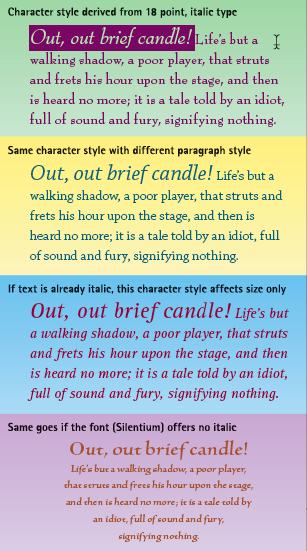
You can apply styles to paragraphs and to individual characters within paragraphs.
In this excerpt, page-layout expert Deke McClelland demystifies style sheets. He’ll show you how easy it can be to include them in your workflow. By the end of this chapter, you’ll be a convert!
We’ve posted this excerpt as a PDF file. To open the PDF file in your Web browser, click “Styles.” You can also download the PDF to your machine for later viewing.
To open the PDF, you’ll need Adobe Acrobat or Adobe Reader. To download Acrobat Reader click below:
 .
.
To learn how to configure your browser for viewing PDF files, see the Adobe Reader tech support page.
Copyright © 2006 Type & Graphics, Inc. All rights reserved. Adobe InDesign CS2 One-on-One, by Deke McClelland. ISBN 0-596-10097-3. https://www.oreilly.com/catalog/adobeindesign2/
This article was last modified on January 10, 2022
This article was first published on May 3, 2006
Commenting is easier and faster when you're logged in!

Recommended for you
Create Parallax Transitions in PowerPoint
Create dramatic 3D scenes with Stephy Hogan using Morph.

A Script to Rotate Objects in InDesign with an Object Style
If you were to ask me how to use an object style to rotate objects in InDesign,...